Hello,
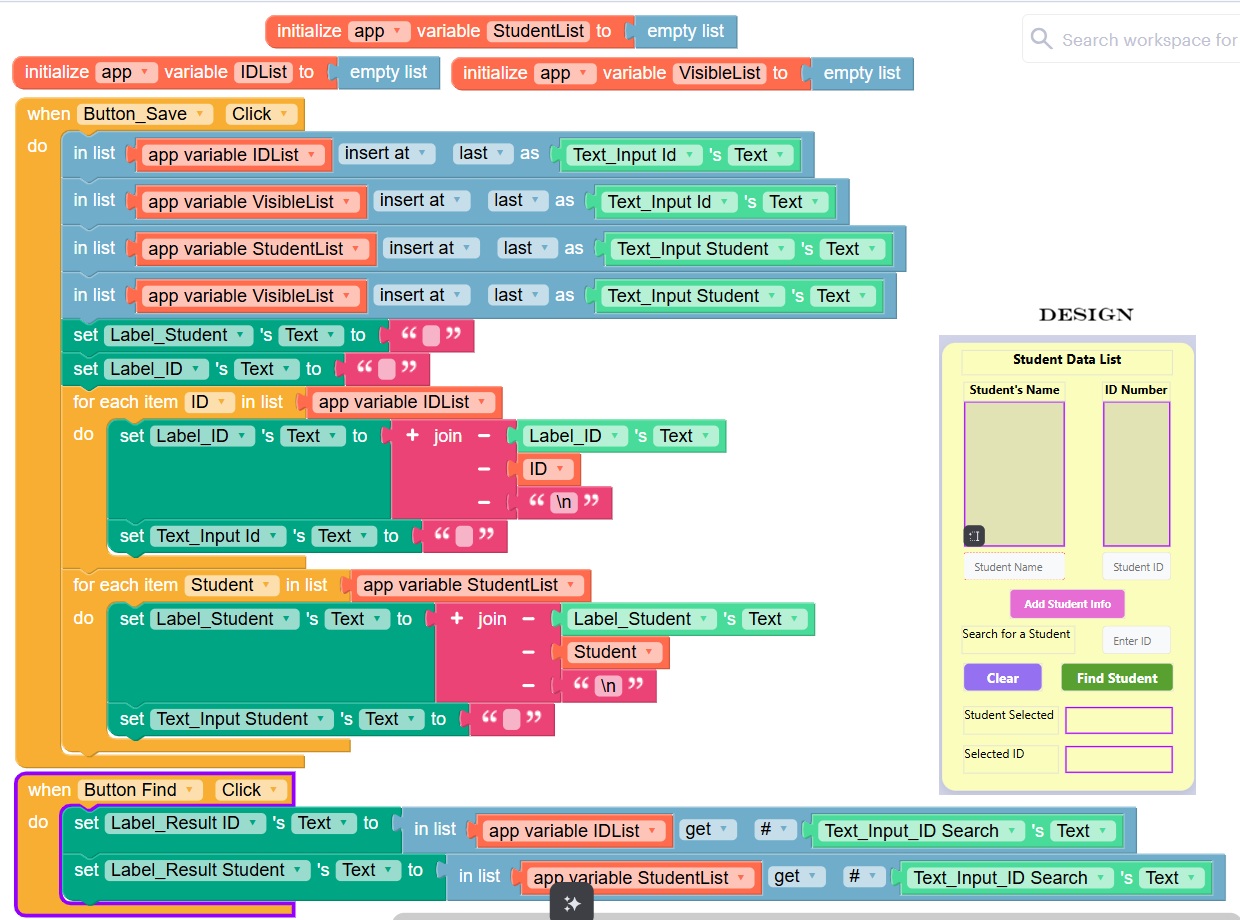
I have a little issue and any help is appreciated. I have created an app that allow you to enter a name and an ID into a text input and once you click the Add Button, the data is shown in the two big labels (see screenshots of how it works)
Next, when you enter an ID into the search and click the Find Button, it should pull out the correct name and ID associated with it. The problem I am having is that when I test it with just one number (i.e. A.1 or Bob.1) it works fine. But when I use more than one number for ID (i.e. A.123 or Bob 123) I get Undefined as a result. (see examples)
I have tried different things, but I am stumped as to why it works one way but not with more than one number. I am including the blocks.
Thanks
Can you share a link to the project?
Sure. Let me know if it’s not showing up.
I went ahead and made a demo of the way I would input the data:
Enter names and IDs on each line and then click Submit to see the comma-separated list of names and IDs below.
The reason your search isn’t working is because you are asking Thunkable to find, for example, “1”, which is in “1” and also “123” and also “1548” and “61”, etc. You need to do that in a different way. What I usually do is “bookend” the input with special characters. So if the user enters “12”, I store that as 12 and then when I retrieve it for the search, I make it “#12#” and then I search for “#[search key]”. Or you can store it as “#12#” and use a list block to look for that same search key value.
Another method – perhaps simpler – is to flip the search. By that I mean that you find the database value within the search key. So instead of searching for “1” in “12” and “124”, you search for the stored database value (let’s say 12) in the user’s search key input. Does “12” contain “124”? No. Does it contain “1”? No. Does it contain “12”? Yes. So only a search key of 12 will work for that database value. And you can check that within a loop of the database column values.
Thank you, I’ll take a close look at the code and see if I can use it to include a search option to find a specific (name; ID)