Hi Team,
I’ve encountered another layout issue on Android and I’ve put together a very simple test app to demonstrate it.
The app contains a Layout at the top of the screen, top aligned with a height of 200px and a 1px border. Inside that Layout are four stacked Containers:
- Red = 50px
- Green = 50px
- Purple = 50px
- Blue = 50px
Together they add up exactly to the Layout height of 200.
I’ve also added labels which display the height of each Container and the total Layout height so we can see what Thunkable thinks the dimensions are.

When I press the Expand button, the app adds 50 to both the red Container and the Layout itself. So the red Container becomes 100 and the Layout becomes 250. Since both values increase by the same amount, the Containers should continue to perfectly fill the Layout.
This is exactly what happens on the iPhone and in the PC Live Test environment:
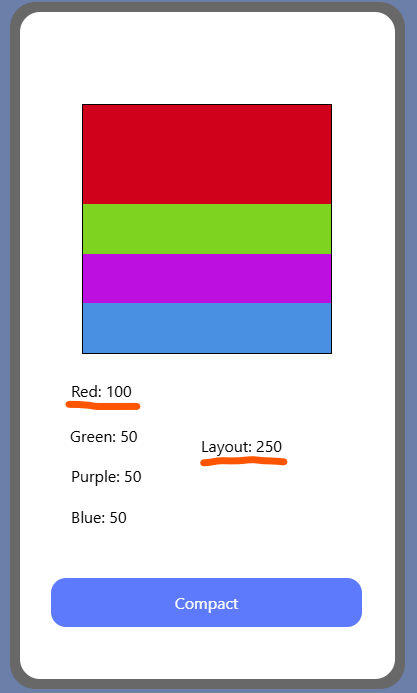
However, on both the Android Live App and exported APKs, the Layout visually grows much larger than expected and leaves a large blank area at the bottom:

The strange part is that all of the measurements still appear to be correct:
Red: 100
Green: 50
Purple: 50
Blue: 50
Layout: 250
The numbers add up perfectly, yet there is clearly a large empty area inside the Layout.
What’s even more confusing is that the gap grows as the Layout grows. The larger the Layout becomes, the larger the discrepancy becomes.
To me this looks like the Layout is being rendered at a different height than the height reported by the Height blocks. In other words, the visual Layout and the values returned by the blocks appear to be drifting apart.
Has anyone else seen this behaviour, or can anyone from the Thunkable team explain why the Layout is visually larger than the dimensions being reported by the blocks?
The project I’m working on currently involves multiple layers of expanding layouts and so being unable to reliably resize a layout and the components within it is a big roadblock to completion.


