The Solution
After a lot of testing across different Android devices, I have landed on a solution that actually works.
This is a small, lightweight set of blocks that automatically calibrates your layout height so it fits the screen perfectly on any device.
It runs once per device, stores the correct layout height locally, and from that point on every screen in your project just uses that stored value. No guessing, no formulas, no device checks.
You can see the blocks I am using for:
-
the first screen in the app
-
every other screen

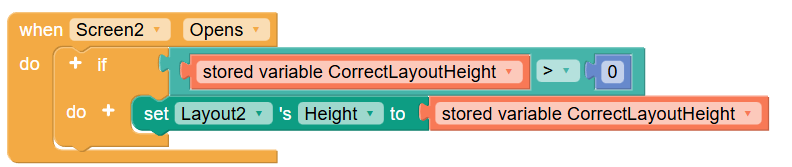
Just copy them as shown.
What this solves
Thunkable layouts fail on Android because:
-
the height you set is not the height you actually get
-
the difference varies by device, OEM scaling, and system UI
-
there is no reliable way to predict this with a formula
However, Thunkable does let us:
-
read the screen computed height
-
read the layout computed height
-
change the layout height
That turns this into a measurable problem instead of a predictive one.
How it works
Step 1: First screen only
When the first screen opens, we check if a stored layout height already exists.
-
If it exists, we just apply it and do nothing else.
-
If it does not exist, we run a short calibration routine.
This only ever happens once per device.
Step 2: Measure the error
We calculate how far off the layout is using:
Screen Computed Height minus Layout Computed Height
-
If the result is positive, the layout is too short.
-
If the result is negative, the layout is too tall.
This number tells us exactly how wrong we are.
Step 3: Correct the height
We then adjust the layout height by that exact amount.
So if the layout is 20 pixels too short, we add 20.
If it is 15 pixels too tall, we subtract 15.
Step 4: Repeat briefly
We wait a moment for the layout to settle, re-measure, and repeat if needed.
In practice:
-
most devices converge in 1 pass
-
some need 2
-
very rarely more than that
We cap the process at a small number of attempts so it can never loop endlessly.
Step 5: Store the result
Once the layout height is close enough to the screen height, we store it in a stored variable.
From that point on, every screen just sets its layout height to this stored value
Why this works when formulas do not
All previous approaches try to predict the correct height using screen size, aspect ratio, or device type.
That does not work reliably because Android applies hidden scaling that Thunkable does not expose.
This approach does not predict anything.
It measures what actually happened on that device and corrects it.
Because the relationship between declared height and computed height is stable per device, the correction converges almost immediately.
How to use this in your project
-
Add the first block set to your first screen only
-
Add the second block set to every other screen
-
Use the same layout structure across screens
-
Do not change the status bar state after calibration
That is it.
Final notes
-
This works in published APKs. The Live App may still show white space.
-
The calibration runs once and is stored locally.
-
This avoids all device checks, formulas, and heuristics.
-
It has been tested across many different Android phones with different aspect ratios and OEMs.
If you try this on additional devices, I would love to hear how it behaves!
Here’s a link to a project you can remix at your leisure:
Thanks to everyone who submitted their results on the previous test app and to @martint for giving me the idea to solve this issue with blocks.
