Done a bit of testing with this as I need to update a few apps and as you say opening them in this current build kills the layouts which were fine previously.
It appears to be an issue with the status bar interfearing with the layout sizes so after quite a lot of trial and error with different settings this fairly simple method seems to provide a more dynamic workaround:
Add these blocks in your first screen

Then this in all other screens
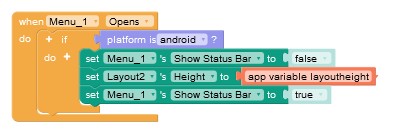
I have tested with the example from this post and seems to give the desired effect.
Give it a try on some different devices and let me know the results.
I used this version as tablets/larger screens seem to act differently and need a small amount of pixels removing. use the same blocks as above for the other screens.

Please note there is still some white space at the bottom in the live app but perfect when downladed/published.