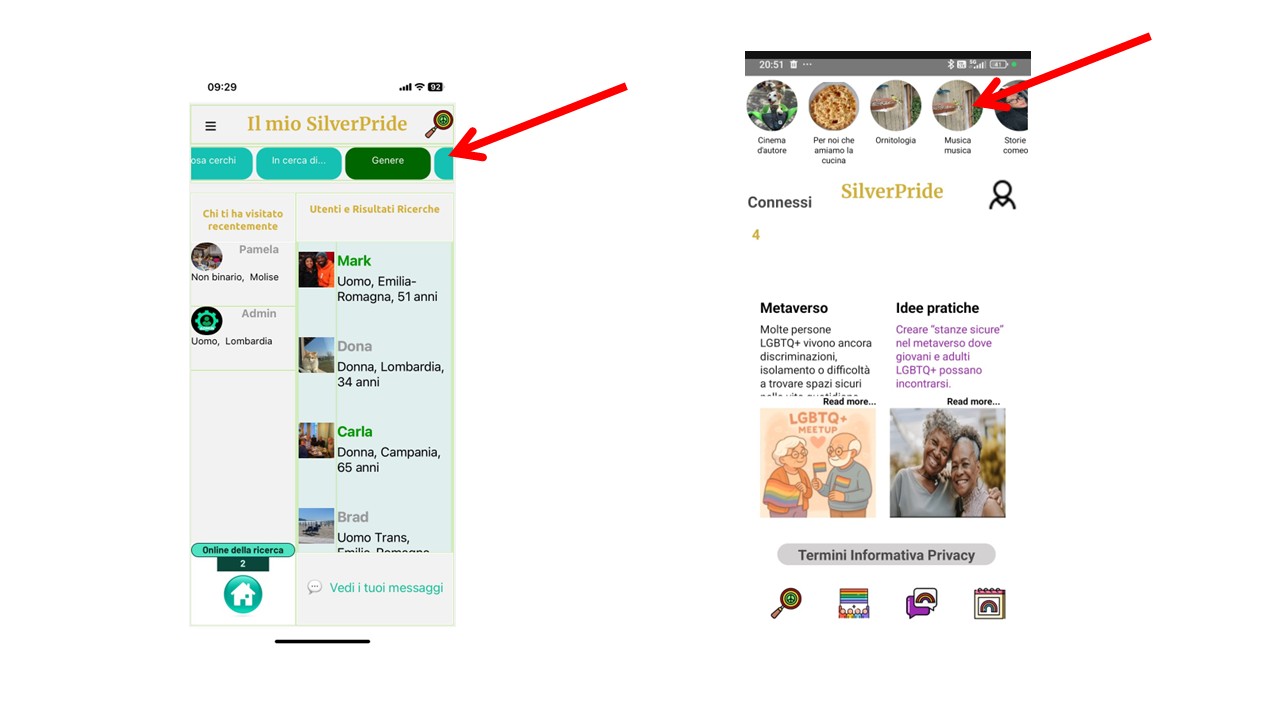
Until a few days ago, we had published our app and there were no layout issues at all. Today we went back to Thunkable to make a small change, and we noticed that—without changing anything—in some pages the buttons became squashed or cut off, and some containers changed their size.
This happens on Thunkable Live on mobile, but not on the Live preview on PC. It also happens when we generate an APK of the app.
How is this possible? It must be a very recent Thunkable bug that is preventing us from updating our app. We request immediate assistance, as we cannot redo the entire layout again. We hope the team understands the urgency of the matter.
Hi Ioannis, I’m attaching an image that shows how these two rows looked before they became distorted, without having changed absolutely anything. There are other elements that also became distorted, but to a lesser extent.
Regards
Hi Martint, and thank you for your advice that we really appreciate.
Here are some additional details about the issues we’re experiencing.
First of all, although to a lesser extent, the layout is also being altered on iOS devices. You mentioned that the live test bar might be causing some rows to get compressed on certain screens, but this issue occurs even when we download or publish the app. This suggests that the layout is affected regardless of the testing mode.
I don’t believe the app should be modified by new blocks or similar elements. If this behaviour is happening spontaneously, it’s clearly a bug that needs to be fixed as soon as possible.
Thunkable is a paid platform, and it should guarantee consistency and avoid sudden, illogical changes like this.
The native OS status bar at the top of the screen not the ‘Live test bar’. Im never overly worried if the look is slightly off in the live test app, its the downloaded/published app that matters.
I agree there is a layout fault in one of the last platform updates and should be resolved by the provider but if you need to update quick sometimes a workaround is the best option.
If your seeing any issues in ios then this is possibly not the same issue as in all my testing across different platforms and devices it only appears to be affecting Android.
Hi @pmginvestda6z
Thank you for sharing more information and screenshots.
I checked these screens and here is what I found:
On “Home_SP_IT” screen, the components inside the Layout have more than 100% height in total.
On “Il mio SilverPride” screen, the total height of all the Layouts.
On the “Il mio SilverPride” screen, do you mean that the issue is that the component is horizontally or vertically cropped?
Hi Ioannis, and thank you for your advice. I will of course try the corrections you suggested.
What makes the situation truly frustrating is that the app was being used and published with the correct layouts, and then suddenly the layout changes without any modification on our side.
Moreover, the fact that what appears in the web live preview is completely different from the live preview on the mobile device is extremely irritating. Working this way in a development environment is ineffective. This is something Thunkable should take seriously, because the amount of time we lose dealing with inconsistencies, bugs, and unexpected changes makes Thunkable a platform that cannot be recommended for projects of this kind.
For your information, the “My SilverPride” container is already scrollable, and yet the buttons at the top are still compressed in the mobile live preview, while they appear correctly in the web live preview.
At this point, we have an urgent need to resolve this very embarrassing situation for Thunkable. I would like to remind you once again that our app was working perfectly until a few weeks ago, and no changes were made on our side. Upon reopening the Thunkable development environment and WITHOUT applying any modifications, we found several distorted layouts in both the Thunkable Live app on the mobile device and in the APK.
We focused on the “Il mio SilverPride” page and implemented all your recommendations regarding container and button parameters exactly as you suggested. After seeing no improvement, we spent many hours systematically attempting to resize components, again without success.
It is important to strongly emphasize that the layout displayed in the development environment and its corresponding Live preview does not reflect the layout shown in the Live version on the mobile device. This alone is a serious issue that makes app development practically impossible on your platform, given the significant inconsistencies between the Thunkable web development interface and the only real way to test the app, which is the mobile Live environment.
For this reason, and in order for us to move forward with our app, we kindly ask you to provide us with exactly which changes need to be made in both the “Home_SP_IT” page and the “Il mio SilverPride” page.
Hi @pmginvestda6z
One reason that this issue is happening is that the width and height of the phone on the web preview are different from the width and height of your phone.
Could you please share more information about the design issues?
Which specific thing is different?
Please also include screenshots from the web preview and live app for each screen.