Hi everyone.
I am creating a stress reduction app for a research project using Firebase for the users’ usernames and passwords. With the help of Catsarisky, I got the sign up to work in Firebase without verifying email addresses by having my users create a 6-digit user id attached to a bogus domain and a password. Thanks again Cathy! 
I cannot use email addresses for this project to protect participants’ identities.
Now I am trying to find a way to create a password reset page, but I have not been successful.
Here are my blocks for the sign in/sign up page (which is working great!)

-
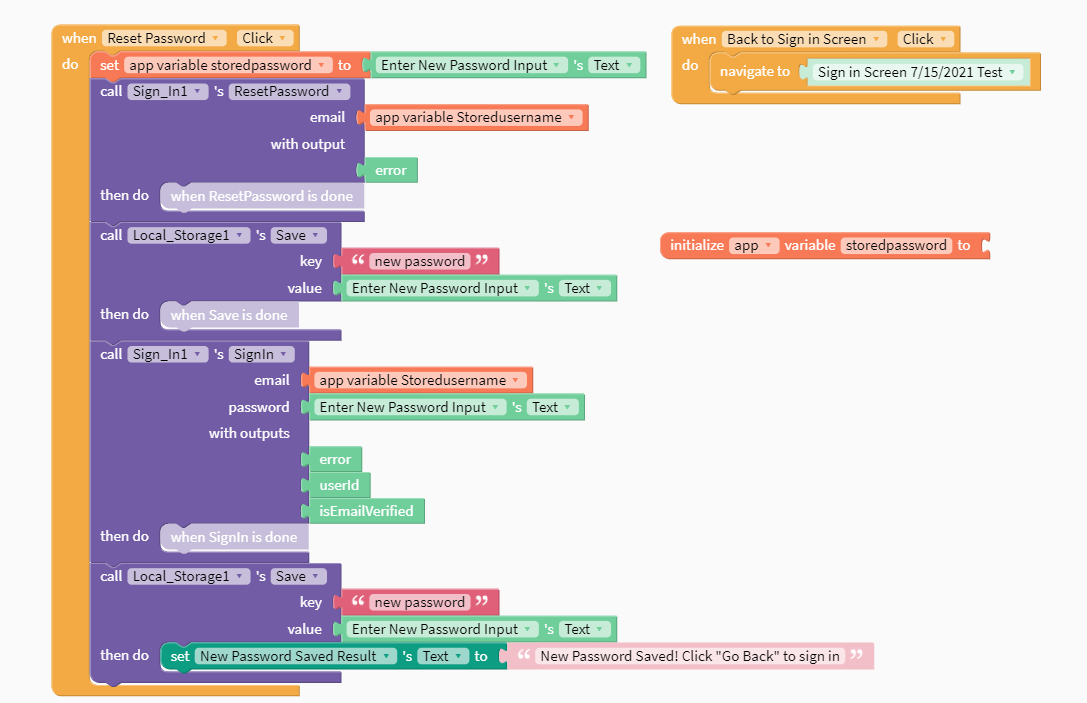
the blocks I have so far on my password reset page (which is not working)

-
A video of the error. In the video I am using the password “apples” and signed in successfully, but when I try to change the password to “bananas”, it rejects the new password.