# Why don't ask "Grid name" in Airtable when using dataviewer
**URL:** https://community.thunkable.com/t/why-dont-ask-grid-name-in-airtable-when-using-dataviewer/566844
**Category:** Questions about Thunkable X
**Tags:** data-viewer
**Created:** [May 15, 2020, 7:35am UTC](https://community.thunkable.com/t/why-dont-ask-grid-name-in-airtable-when-using-dataviewer/566844 "2020-05-15T07:35:28Z")
**Posts on this page:** 4
**Page:** 1
### Author:  [@saramdl.gaunde021](https://community.thunkable.com/u/saramdl.gaunde021)
#### Post date: [May 15, 2020, 7:35am UTC](https://community.thunkable.com/t/why-dont-ask-grid-name-in-airtable-when-using-dataviewer/566844/1 "2020-05-15T07:35:28Z")
when use Airtable, has needed API key, Base ID, Table name, and Grid name.
And recently Dataviewer and Datasource came out. (which i love so much)
But somehow in Dataviewer it only ask me about which table i use. not “view”.
Actually i need Filtered+real time Clone Spreadsheet. like this

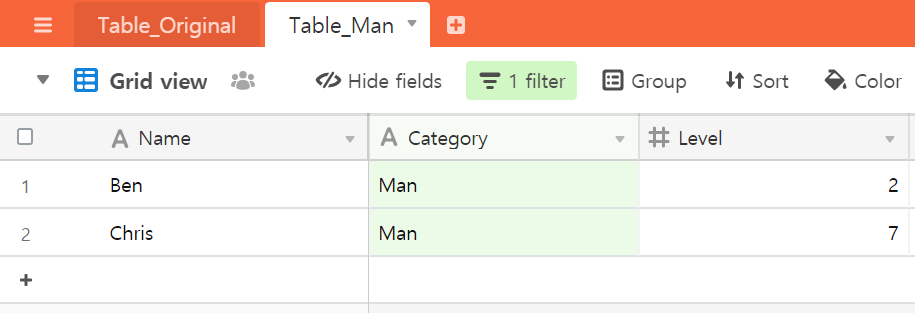
So i asked to Airtable community about this : [How can i make (real-time) clone/duplicated table? - Ask the community - Airtable Community Forum](https://community.airtable.com/t/how-can-i-make-real-time-clone-duplicated-table/29971)
But the answer is basically no.
So i think if thunkable ask view, then problem solved. (but it might be not a simple issue… i guess)
Or if just google spreadsheet is available then all my problem solved.
But i just can’t use google sheet as neither dataviewer or datasource.
(here is my previous ask [🎉 Latest Thunkable ✕ Release; NEW COMPONENTS Data Viewer List and Data Viewer Grid! 2020-05-05 - #22](http://community.thunkable.com/t/latest-thunkable-release-new-components-data-viewer-list-and-data-viewer-grid-2020-05-05/564204/22) )
What is the best option i can expect?
---
### Author:  [@jared](https://community.thunkable.com/u/jared)
#### Post date: [May 15, 2020, 1:55pm UTC](https://community.thunkable.com/t/why-dont-ask-grid-name-in-airtable-when-using-dataviewer/566844/2 "2020-05-15T13:55:07Z")
You could have your app save them to two different spots in your table if you really need, i suppose.
One alternative currently is still making your own DIY list viewer
---
### Author:  [@athornock](https://community.thunkable.com/u/athornock)
#### Post date: [May 15, 2020, 2:13pm UTC](https://community.thunkable.com/t/why-dont-ask-grid-name-in-airtable-when-using-dataviewer/566844/3 "2020-05-15T14:13:25Z")
Once Thunkable updates a few blocks for the local tables you should be able to generate your own views during runtime. But as Jared suggests, right now it’s best to generate a list and use list viewer. I bet this will be solved soon.
---
### Author:  [@ioannis](https://community.thunkable.com/u/ioannis)
#### Post date: [November 8, 2024, 11:26am UTC](https://community.thunkable.com/t/why-dont-ask-grid-name-in-airtable-when-using-dataviewer/566844/4 "2024-11-08T11:26:46Z")