# Web API on Web Live Test generates an error with Firebase NodeJS endpoint
**URL:** https://community.thunkable.com/t/web-api-on-web-live-test-generates-an-error-with-firebase-nodejs-endpoint/1040702
**Category:** Questions about Thunkable X
**Created:** [December 21, 2020, 5:29pm UTC](https://community.thunkable.com/t/web-api-on-web-live-test-generates-an-error-with-firebase-nodejs-endpoint/1040702 "2020-12-21T17:29:26Z")
**Posts on this page:** 7
**Page:** 1
### Author:  [@drted](https://community.thunkable.com/u/drted)
#### Post date: [December 21, 2020, 5:29pm UTC](https://community.thunkable.com/t/web-api-on-web-live-test-generates-an-error-with-firebase-nodejs-endpoint/1040702/1 "2020-12-21T17:29:26Z")
I’m working with a Web\_API component. My endpoint is a NodeJS function on firebase that I created. Right now, it does a whole lot of nothing:
> exports.MyFirstHTTPSListener = functions.https.onRequest((req,res) =\> {
> res.status(200).json({message:‘it worked’});
> });
The function works as expected in a Chrome Browser on Windows 10

It also works on Android Live Test

It does not work on Web Live Test or preview.

blocks are pretty straightfoward
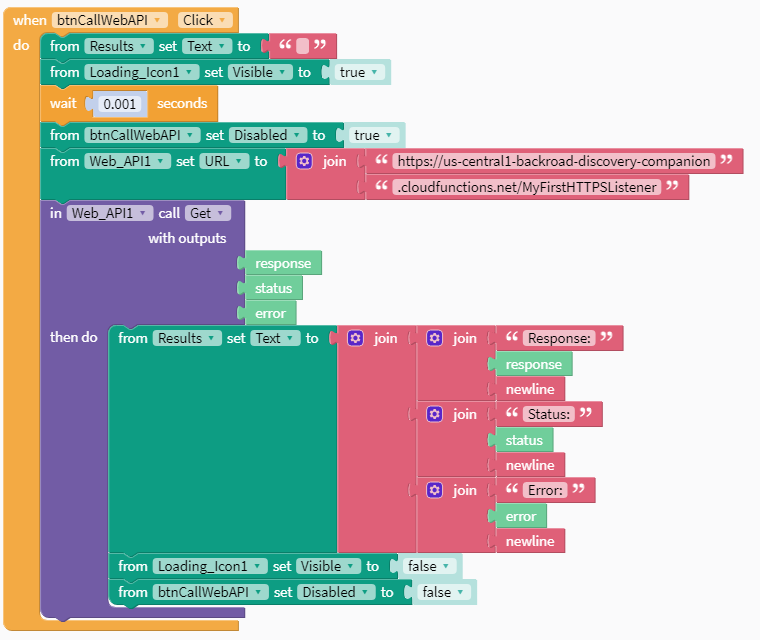
Is this a know or expected behavior? project Link here: [Thunkable](https://x.thunkable.com/copy/1079fa6b92806a263d3aa2bcd09a0333)
---
### Author:  [@muneer](https://community.thunkable.com/u/muneer)
#### Post date: [December 21, 2020, 7:37pm UTC](https://community.thunkable.com/t/web-api-on-web-live-test-generates-an-error-with-firebase-nodejs-endpoint/1040702/2 "2020-12-21T19:37:45Z")
It seems to be a recurring issue
> [@Issue with \*Live Test\* web calling an API](http://community.thunkable.com/t/issue-with-live-test-web-calling-an-api/920784):
>
> My app is tied closely to an API that is on a server (my desktop here at home) that is only accessible over http (not https) Everything is working fine if I do live testing on my phone, but if I use Live Test web view, the webserver here doesn’t like the request, reporting: 2020-10-21 19:41:29 -0600: HTTP parse error, malformed request (): #\ My gut is this is because the [thunkable.com](http://thunkable.com) Live Test is running on https, but that’s only a …
> [@Instability when accessing Firebase with my own API key on Live Test Web](http://community.thunkable.com/t/instability-when-accessing-firebase-with-my-own-api-key-on-live-test-web/653720):
>
> My name is Carlos and I am from a small company in Brazil. I’m starting to use Thunkable to create games and learning apps for my training. First, I would like to say that Thunkable is wonderful. The future of programming. Thank you! About my problem … In the last few days, and in the meantime yesterday, the my apps have stopped accessing my database in Firebase, using Live Test Web. I also can’t log in to my Firebase project anymore. The return from Firebase is “Your API key is invalid, please…
---
### Author:  [@drted](https://community.thunkable.com/u/drted)
#### Post date: [December 21, 2020, 7:42pm UTC](https://community.thunkable.com/t/web-api-on-web-live-test-generates-an-error-with-firebase-nodejs-endpoint/1040702/3 "2020-12-21T19:42:36Z")
Thanks @muneer
---
### Author:  [@gene.arnold9d](https://community.thunkable.com/u/gene.arnold9d)
#### Post date: [June 4, 2021, 7:41pm UTC](https://community.thunkable.com/t/web-api-on-web-live-test-generates-an-error-with-firebase-nodejs-endpoint/1040702/4 "2021-06-04T19:41:10Z")
Dealing with the same issue now
---
### Author:  [@tatiang](https://community.thunkable.com/u/tatiang)
#### Post date: [June 4, 2021, 10:31pm UTC](https://community.thunkable.com/t/web-api-on-web-live-test-generates-an-error-with-firebase-nodejs-endpoint/1040702/5 "2021-06-04T22:31:24Z")
There are quite a few APIs that only work on a mobile device, not when previewed in a browser.
---
### Author:  [@drted](https://community.thunkable.com/u/drted)
#### Post date: [June 6, 2021, 10:59pm UTC](https://community.thunkable.com/t/web-api-on-web-live-test-generates-an-error-with-firebase-nodejs-endpoint/1040702/6 "2021-06-06T22:59:19Z")
Check out this thread which has a solution if it is your site… [Create Your Own Web API Service Using Firebase Functions and NodeJS!](https://community.thunkable.com/t/create-your-own-web-api-service-using-firebase-functions-and-nodejs/1040762)
---
### Author:  [@ioannis](https://community.thunkable.com/u/ioannis)
#### Post date: [November 8, 2024, 12:19pm UTC](https://community.thunkable.com/t/web-api-on-web-live-test-generates-an-error-with-firebase-nodejs-endpoint/1040702/7 "2024-11-08T12:19:37Z")