### Author:  [@henrikhngj5](https://community.thunkable.com/u/henrikhngj5)
#### Post date: [April 28, 2020, 12:54pm UTC](https://community.thunkable.com/t/variables-get-duplicated-when-importing-a-screen/564265/1 "2020-04-28T12:54:14Z")
I find the feature of saving a screen to “My Screens” super useful, often I want to try out a different strategy for some problem, and starting from something known is better than starting from scratch.
However, I often find myself in trouble as all app variables and imported features get doubled when I use the screen again.
Am I doing it all wrong?
How do you use this feature?
Henrik
---
### Author:  [@jared](https://community.thunkable.com/u/jared)
#### Post date: [April 28, 2020, 1:57pm UTC](https://community.thunkable.com/t/variables-get-duplicated-when-importing-a-screen/564265/2 "2020-04-28T13:57:54Z")
Yes. I posted this on github recently. Check it out here. It probably could use a better title
>
>
> Thanks so much for filing an issue or feature request! Please fill out the follo…wing (wherever relevant):
>
> The more info, the faster we will be able to address it!
>
> \### Platform
> Thunkable X
>
> \### Issue/Request Origin
> My own experience:
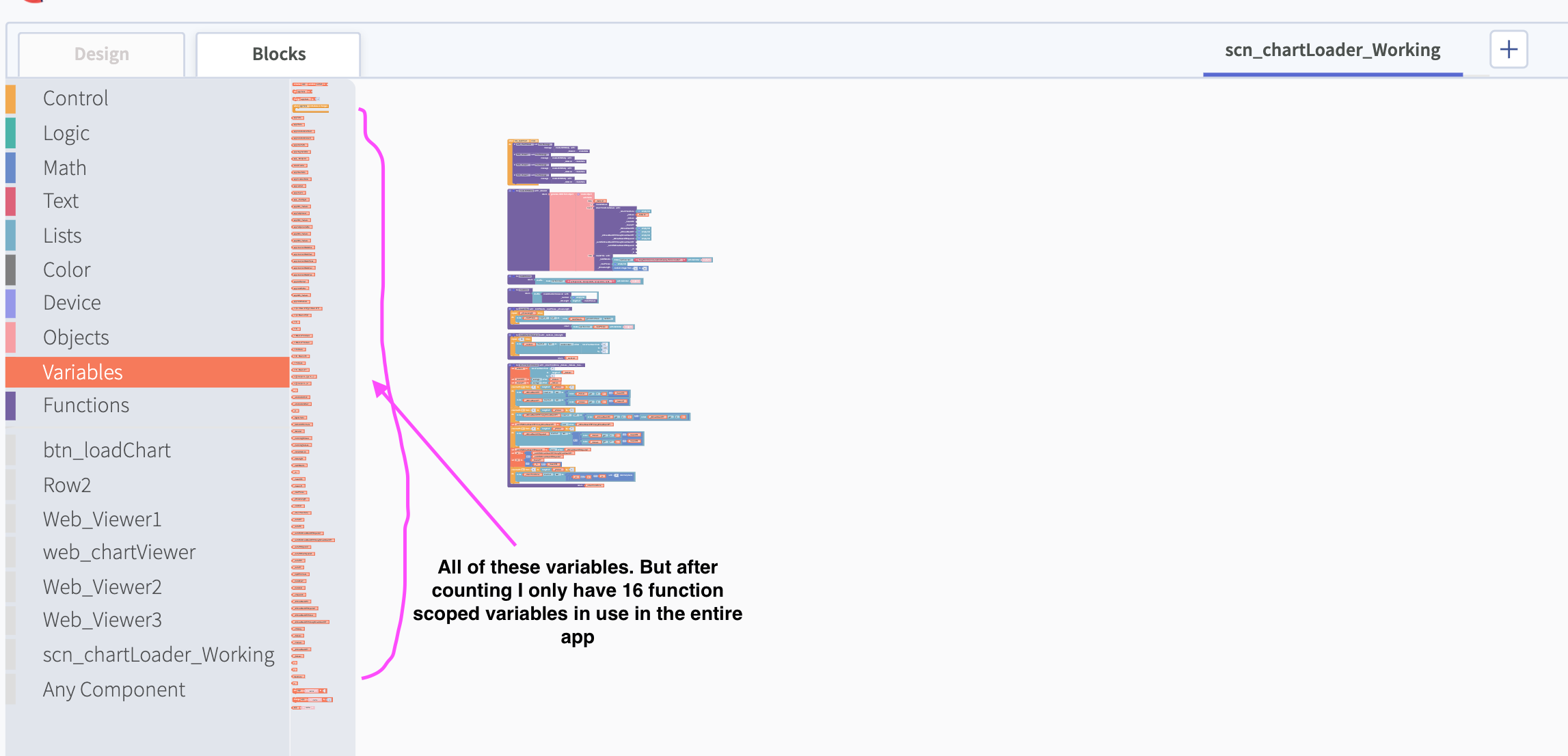
> When i create a function, i may create input parameters and use those as locally scoped variables. Great! But, when i delete that function, those locally scoped variables do not disappear from the variable list. I can still call them. This clogs my apps after a while If I have made many mistakes.
>
> This was a known bug. But now, this is happening with 'app type' variables. these usually go away but aren't anymore in one of my projects.
>
> i tried copying the screen and only the components but they arent going away.
>
> \### Steps to Reproduce
> 1. create a function with input parameters
> 2. use those variables created by the input parameters somewhere
> 3. delete the function
> 4. copy the screen to a new app
>
> \### Project Link
> https://x.thunkable.com/copy/03f705f72920cb703614d8891604844f
>
> \### Expected Behavior
> function scope and app scope variables should not still be in the blocks tree.
>
> \### Actual Behavior
> I can still call these variables. (i honestly don't even know if they work, i just wanted them gone)
>
>
> \ ---
---
### Author:  [@domhnallohanlon](https://community.thunkable.com/u/domhnallohanlon)
#### Post date: [April 28, 2020, 2:11pm UTC](https://community.thunkable.com/t/variables-get-duplicated-when-importing-a-screen/564265/3 "2020-04-28T14:11:34Z")
Hey @henrikhngj5 - I don’t think you’re doing this wrong, it sounds like it might be a bug on our end.
---
### Author:  [@henrikhngj5](https://community.thunkable.com/u/henrikhngj5)
#### Post date: [April 29, 2020, 2:35pm UTC](https://community.thunkable.com/t/variables-get-duplicated-when-importing-a-screen/564265/4 "2020-04-29T14:35:27Z")
Thanks Domhnall,
It is driving me crazy as it dublicates all my invisible components, which in turn, when I delete the dublicates, invalidates all my screens, and I have to go searching for the errors everywhere.
This sparked a great idea, in my own humble opinion…, what if you could click the error icon with the number and auto scroll to next error? going through a long block sequence trying to see the warning sign is painful, and if you have to do it often…
Well , perhaps just an idea…
---
### Author:  [@artificialdama4u](https://community.thunkable.com/u/artificialdama4u)
#### Post date: [May 2, 2020, 11:43pm UTC](https://community.thunkable.com/t/variables-get-duplicated-when-importing-a-screen/564265/5 "2020-05-02T23:43:02Z")
Hi all.
Yes, variables are not deleted when you delete an specific function but at least you can delete them manually.
> [@\[Solved\] How can we delete function type variables no longer in use?](http://community.thunkable.com/t/how-can-we-delete-function-type-variables-no-longer-in-use/563743/5):
>
> Hey @jared I know how to do that… [[Delete variables Thunkable X] ](https://www.youtube.com/watch?v=1ToMPn9jEDE)
By the way, when re-using screens and blocks with “My Screens” can put in your project a couple of variables with same name but behind the variable name there is a unique id, so you just need to change the name to the first duplicated variable and you’ll see in blocks which one changes. 😉
---
### Author:  [@antje.smilesyft](https://community.thunkable.com/u/antje.smilesyft)
#### Post date: [June 12, 2020, 2:13pm UTC](https://community.thunkable.com/t/variables-get-duplicated-when-importing-a-screen/564265/6 "2020-06-12T14:13:11Z")
I just ran into the same thing . I was so confused when suddenly I had lots of duplicates of my invisible components, but then I figured it was from copied screens and saw your post confirming it.
I actually don’t know if duplicates will have an impact and if so which one, i.e. on app performance. I did clean things up manually though by deleting duplicates and then finding and correcting errors in the blocks. This was slightly tedious, but from now on I can do this first thing every time I add a screen from the saved screens.
---
### Author:  [@thestrengthinstitute](https://community.thunkable.com/u/thestrengthinstitute)
#### Post date: [June 13, 2020, 9:22am UTC](https://community.thunkable.com/t/variables-get-duplicated-when-importing-a-screen/564265/7 "2020-06-13T09:22:25Z")
I have been having the same problem.
One of the workarounds I have used is **just rename the invisible components when I add them for the first time**. For example, if I add an Alert, the default name is usually Alert\_1. I will change it to say, “Screen3Alert”. Now when I duplicate the screen, the duplicate alert is added as Alert\_1 and I immediately know which ones to delete.
---
### Author:  [@ioannis](https://community.thunkable.com/u/ioannis)
#### Post date: [November 8, 2024, 11:27am UTC](https://community.thunkable.com/t/variables-get-duplicated-when-importing-a-screen/564265/8 "2024-11-08T11:27:05Z")