# \[Solved\] Using the sign in component in the new UI
**URL:** https://community.thunkable.com/t/solved-using-the-sign-in-component-in-the-new-ui/1040713
**Category:** Questions about Thunkable X
**Tags:** solved, draganddrop
**Created:** [December 17, 2020, 5:08pm UTC](https://community.thunkable.com/t/solved-using-the-sign-in-component-in-the-new-ui/1040713 "2020-12-17T17:08:22Z")
**Posts on this page:** 16
**Page:** 1
### Author:  [@jared](https://community.thunkable.com/u/jared)
#### Post date: [December 17, 2020, 5:08pm UTC](https://community.thunkable.com/t/solved-using-the-sign-in-component-in-the-new-ui/1040713/1 "2020-12-17T17:08:22Z")
With this new UI and block design I notice that:
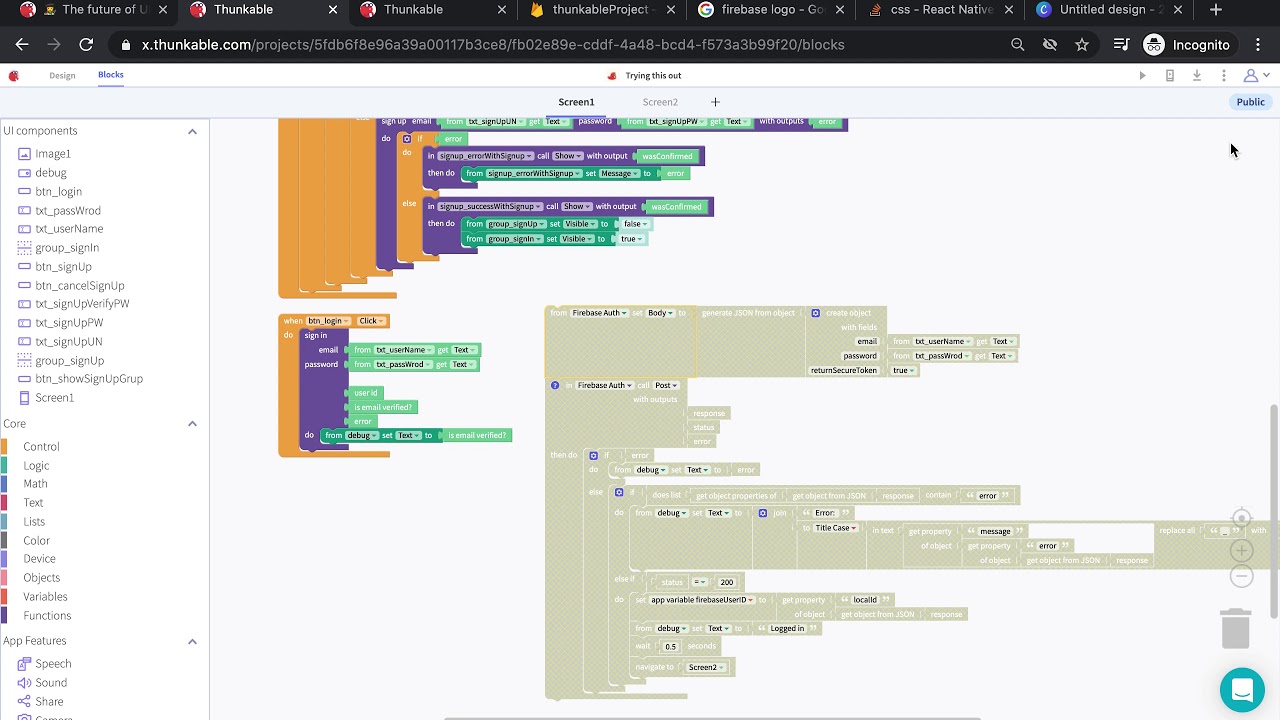
the Sign in component is behaving a little wonky. The isUserVerified block is not returning data nor is the error block as of 12:06EST 12/17/20. I have resorted to using the firebase API which works wonderfully, but is the lowcode solution i was looking to avoid.
this isnt working for me.

this is though

---
### Author:  [@janhavidahihande](https://community.thunkable.com/u/janhavidahihande)
#### Post date: [December 17, 2020, 5:57pm UTC](https://community.thunkable.com/t/solved-using-the-sign-in-component-in-the-new-ui/1040713/2 "2020-12-17T17:57:07Z")
Hello @jared,
Sorry to hear that you are facing this issue. I created a sample Sign In project similar to yours and it seems to work fine for me.
Attaching the link [here](https://x.thunkable.com/copy/d9333cc70e9c547d4e8aad89c9f1afed)
Can you please take a look to see whether it solves your issue. If not, please DM me and we can work towards a solution.
Thanks!
---
### Author:  [@jared](https://community.thunkable.com/u/jared)
#### Post date: [December 17, 2020, 6:21pm UTC](https://community.thunkable.com/t/solved-using-the-sign-in-component-in-the-new-ui/1040713/3 "2020-12-17T18:21:50Z")
Strange! I tried your project and it worked.
Mind trying mine? It’s still not doing the same
[https://x.thunkable.com/projectPage/5fdba0a9282ed200110dff2b](https://x.thunkable.com/projectPage/5fdba0a9282ed200110dff2b)
[ ](https://www.youtube.com/watch?v=BdawqdBeJuA)
---
### Author:  [@domhnallohanlon](https://community.thunkable.com/u/domhnallohanlon)
#### Post date: [December 21, 2020, 9:07pm UTC](https://community.thunkable.com/t/solved-using-the-sign-in-component-in-the-new-ui/1040713/4 "2020-12-21T21:07:08Z")
Slightly off-topic here @jared but the animations look great!
I can’t seem to access your project, did you delete it?
Did you manage to get the sign in component working again?
---
### Author:  [@jared](https://community.thunkable.com/u/jared)
#### Post date: [December 21, 2020, 10:00pm UTC](https://community.thunkable.com/t/solved-using-the-sign-in-component-in-the-new-ui/1040713/5 "2020-12-21T22:00:02Z")
I’m not sure what I idid to it. here you go.
[https://x.thunkable.com/projectPage/5fdb6f8e96a39a00117b3ce8](https://x.thunkable.com/projectPage/5fdb6f8e96a39a00117b3ce8)
I am still having the issue here. not sure why. my custom sign in works fine. really i could restart this because it’s just a demo app to mess with the drag and drop and some api stuff, but it’d be nice to figure out where I’m going wrong
Any thoughts on this @janhavidahihande it’s still acting weird.
---
### Author:  [@domhnallohanlon](https://community.thunkable.com/u/domhnallohanlon)
#### Post date: [May 21, 2021, 1:57pm UTC](https://community.thunkable.com/t/solved-using-the-sign-in-component-in-the-new-ui/1040713/6 "2021-05-21T13:57:34Z")
Thanks for the question @jared
@jane has put together the complete tutorial for using the sign-in component in #draganddrop.
Check it out here:
[ ](https://www.youtube.com/watch?v=tdgVeck-sOI)
---
### Author:  [@lukas\_b\_98knm](https://community.thunkable.com/u/lukas_b_98knm)
#### Post date: [January 8, 2021, 9:47am UTC](https://community.thunkable.com/t/solved-using-the-sign-in-component-in-the-new-ui/1040713/7 "2021-01-08T09:47:40Z")
For the signup I do not see an error component there at the moment as in the old version? How can I replicate the error component?
I have attached the blocks below.
Thanks,
Lukas 

---
### Author:  [@lukas\_b\_98knm](https://community.thunkable.com/u/lukas_b_98knm)
#### Post date: [January 8, 2021, 10:39am UTC](https://community.thunkable.com/t/solved-using-the-sign-in-component-in-the-new-ui/1040713/8 "2021-01-08T10:39:45Z")
Hi,
I have a question regarding the new update. I do not see a signup error component. Also, no userid is created in the database as is the case with the old version. I attached both building blocks and the database.
Please let me know what I can do about that. Thanks!
  
---
### Author:  [@luv.ak.tech](https://community.thunkable.com/u/luv.ak.tech)
#### Post date: [January 8, 2021, 11:10am UTC](https://community.thunkable.com/t/solved-using-the-sign-in-component-in-the-new-ui/1040713/9 "2021-01-08T11:10:48Z")
hey @lukas_b_98knm just just right click on the block and click show advanced block
---
### Author:  [@drted](https://community.thunkable.com/u/drted)
#### Post date: [January 8, 2021, 11:24am UTC](https://community.thunkable.com/t/solved-using-the-sign-in-component-in-the-new-ui/1040713/10 "2021-01-08T11:24:45Z")
Right click on the Sign Up block and select advanced options.
The userid is not available in the new sign in. Who knows if it will be added later. If you save a screen in the column/row designer with the sign in block, you can copy a screen from MyScreens into the drag and drop project and copy the “old” sign in block into the drag and drop screen. Will that continue to work in the future? who knows?
---
### Author:  [@muneer](https://community.thunkable.com/u/muneer)
#### Post date: [January 8, 2021, 11:28am UTC](https://community.thunkable.com/t/solved-using-the-sign-in-component-in-the-new-ui/1040713/11 "2021-01-08T11:28:51Z")

When you choose “Show advanced block” it will change to:

---
### Author:  [@muneer](https://community.thunkable.com/u/muneer)
#### Post date: [January 8, 2021, 11:42am UTC](https://community.thunkable.com/t/solved-using-the-sign-in-component-in-the-new-ui/1040713/12 "2021-01-08T11:42:31Z")
[http://community.thunkable.com/t/missing-blocks-with-new-update/1042356/7?u=muneer](http://community.thunkable.com/t/missing-blocks-with-new-update/1042356/7)
This is the same issue in a different POST by the same MEMBER.
---
### Author:  [@domhnallohanlon](https://community.thunkable.com/u/domhnallohanlon)
#### Post date: [January 8, 2021, 11:52am UTC](https://community.thunkable.com/t/solved-using-the-sign-in-component-in-the-new-ui/1040713/13 "2021-01-08T11:52:28Z")
> [@muneer](#):
>
> different POST by the same MEMBER.
Thanks @muneer!
* * *
@lukas_b_98knm please do not create duplicate posts in the Community, thanks!
* * *
EDIT:
Looking at your blocks, highlighted below, it seems that you’re trying to create a custom user ID. The `user id` block however is a variable that returns the value of the existing user id and not the property name “userId” that you are trying to change.

For example, you have something like:
`{ userID: 42 }`
and you’re trying to set “42” to be the name, email, interests and activities of your user.
---
### Author:  [@lukas\_b\_98knm](https://community.thunkable.com/u/lukas_b_98knm)
#### Post date: [January 8, 2021, 5:18pm UTC](https://community.thunkable.com/t/solved-using-the-sign-in-component-in-the-new-ui/1040713/14 "2021-01-08T17:18:36Z")
Thanks for your help and sorry for causing confusion with the duplicate post!
---
### Author:  [@domhnallohanlon](https://community.thunkable.com/u/domhnallohanlon)
#### Post date: [May 21, 2021, 1:59pm UTC](https://community.thunkable.com/t/solved-using-the-sign-in-component-in-the-new-ui/1040713/15 "2021-05-21T13:59:52Z")
@lukas_b_98knm; merging your question with an older sign-in post.
Check out my post above to the latest video tutorial: [[Solved] Using the sign in component in the new UI - #6 by domhnallohanlon](https://community.thunkable.com/t/solved-using-the-sign-in-component-in-the-new-ui/1040713/6)
---
### Author:  [@ioannis](https://community.thunkable.com/u/ioannis)
#### Post date: [November 8, 2024, 12:19pm UTC](https://community.thunkable.com/t/solved-using-the-sign-in-component-in-the-new-ui/1040713/16 "2024-11-08T12:19:32Z")