# \[Solved\] Sign in component not seeing Firebase?
**URL:** https://community.thunkable.com/t/solved-sign-in-component-not-seeing-firebase/2068707
**Category:** Questions about Thunkable X
**Created:** [October 4, 2022, 7:26am UTC](https://community.thunkable.com/t/solved-sign-in-component-not-seeing-firebase/2068707 "2022-10-04T07:26:13Z")
**Posts on this page:** 5
**Page:** 1
### Author:  [@buildingemploi](https://community.thunkable.com/u/buildingemploi)
#### Post date: [October 4, 2022, 7:26am UTC](https://community.thunkable.com/t/solved-sign-in-component-not-seeing-firebase/2068707/1 "2022-10-04T07:26:13Z")
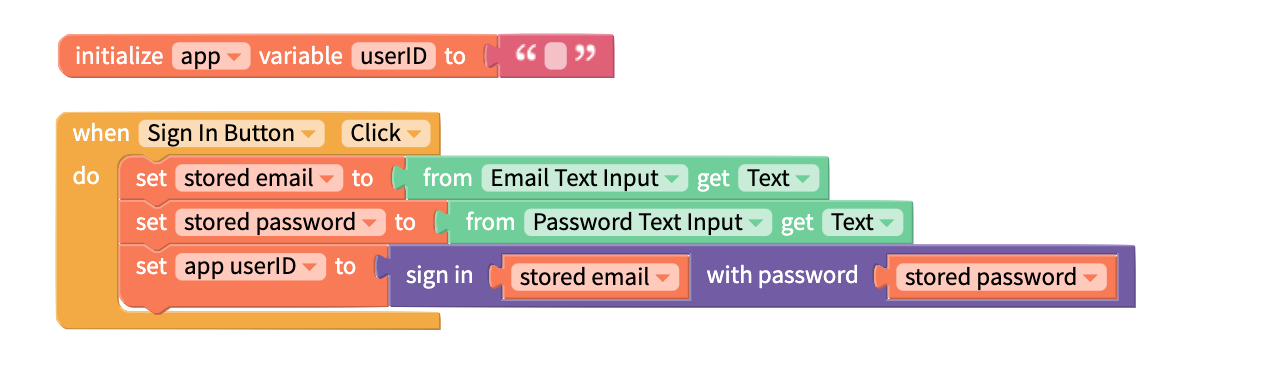
I was having issues with the DragDropCode tutorial so decided to go back to basics and even copying the Sign In documentation works!
[ ](https://2208788433-files.gitbook.io/~/files/v0/b/gitbook-legacy-files/o/assets%2F-LAn5scXl2uqUJUOqkJo%2F-MJWfrtwPxcJj1KnpqoW%2F-MJWisC9W_m6-MTiOvk1%2Fsign-in%20example.png?alt=media&token=7cd7b047-e580-46a8-a3f9-e66b839f388a)
But, when I use the DDC code it says the user doesn’t exist?

---
### Author:  [@brianl](https://community.thunkable.com/u/brianl)
#### Post date: [October 4, 2022, 7:33pm UTC](https://community.thunkable.com/t/solved-sign-in-component-not-seeing-firebase/2068707/2 "2022-10-04T19:33:35Z")
Hi,
Did you use the sign up block, and if so, can you send a picture of those blocks?
Thank you!
---
### Author:  [@tatiang](https://community.thunkable.com/u/tatiang)
#### Post date: [October 4, 2022, 7:41pm UTC](https://community.thunkable.com/t/solved-sign-in-component-not-seeing-firebase/2068707/3 "2022-10-04T19:41:49Z")
It looks like you’re using **two** `when Sign in button Click` blocks to sign in the user. Is there a reason you are duplicating that process? Are you testing those at the same time (which I don’t recommend) or independently?
Also, what happens if you hard code the email and password as text strings (that is, remove the functions temporarily and keep things really simple)?
On the back end in the Firebase Console, you can check to see which usernames have been created by the Sign Up block.
As @brianl mentioned, we’ll need to see your Sign Up blocks.
---
### Author:  [@buildingemploi](https://community.thunkable.com/u/buildingemploi)
#### Post date: [October 4, 2022, 11:03pm UTC](https://community.thunkable.com/t/solved-sign-in-component-not-seeing-firebase/2068707/4 "2022-10-04T23:03:12Z")
I don’t know why but it works suddenly! Also the two buttons was just to show the two versions of the code, they weren’t running concurrently! Anyway, the signup was

Just in case anyone stumbles on this thread in the future. I didn’t make any changes so no idea what fixed my issue, but glad it’s fixed so I can move onto the “real app”! Thanks again guys for your help!
---
### Author:  [@system](https://community.thunkable.com/u/system)
#### Post date: [January 2, 2023, 11:03pm UTC](https://community.thunkable.com/t/solved-sign-in-component-not-seeing-firebase/2068707/5 "2023-01-02T23:03:57Z")
This topic was automatically closed 90 days after the last reply. New replies are no longer allowed.