# \[Solved\] Joining text with a number to use as Airtable column name
**URL:** https://community.thunkable.com/t/solved-joining-text-with-a-number-to-use-as-airtable-column-name/508709
**Category:** Questions about Thunkable X
**Tags:** solved, airtable
**Created:** [March 10, 2020, 10:53pm UTC](https://community.thunkable.com/t/solved-joining-text-with-a-number-to-use-as-airtable-column-name/508709 "2020-03-10T22:53:13Z")
**Posts on this page:** 16
**Page:** 1
### Author:  [@hi1](https://community.thunkable.com/u/hi1)
#### Post date: [March 10, 2020, 10:53pm UTC](https://community.thunkable.com/t/solved-joining-text-with-a-number-to-use-as-airtable-column-name/508709/1 "2020-03-10T22:53:13Z")
I have some columns in my Airtable database. First of them is called “spr1”, the second is called “spr2”, the Nth is called “sprN”.
I need to access them easily, using one for/while structure. How do I do that? How do I convert a digit to text in Thunkable?
Thanks in advance!
---
### Author:  [@jared](https://community.thunkable.com/u/jared)
#### Post date: [March 10, 2020, 11:07pm UTC](https://community.thunkable.com/t/solved-joining-text-with-a-number-to-use-as-airtable-column-name/508709/2 "2020-03-10T23:07:33Z")
If x = 1
Set label 1.text → “choice 1”
Else
Set label 1.text → “other choice”
---
### Author:  [@tatiang](https://community.thunkable.com/u/tatiang)
#### Post date: [March 10, 2020, 11:26pm UTC](https://community.thunkable.com/t/solved-joining-text-with-a-number-to-use-as-airtable-column-name/508709/3 "2020-03-10T23:26:31Z")
Do you mean that you need to convert text to a number? I assume in Airtable you have text (e.g. “3”) and want to use it in a block that requires a number as input.
If not, can you explain how you intend to use the text version of the number?
---
### Author:  [@hi1](https://community.thunkable.com/u/hi1)
#### Post date: [March 11, 2020, 12:13am UTC](https://community.thunkable.com/t/solved-joining-text-with-a-number-to-use-as-airtable-column-name/508709/4 "2020-03-11T00:13:59Z")
The columns look like this.

As you can see, the first column is named “spr1”, the second is called “spr2” and so on.
If I try to access the cell from the 2nd row, 4th column like this it does not work, as A is not a character.
So I need to convert variable A, which is a number, to text.

How do I do that?
---
### Author:  [@jared](https://community.thunkable.com/u/jared)
#### Post date: [March 11, 2020, 1:40am UTC](https://community.thunkable.com/t/solved-joining-text-with-a-number-to-use-as-airtable-column-name/508709/5 "2020-03-11T01:40:32Z")
does this help?

could you rename your airtable columns to better work for you?
---
### Author:  [@tatiang](https://community.thunkable.com/u/tatiang)
#### Post date: [March 11, 2020, 3:26am UTC](https://community.thunkable.com/t/solved-joining-text-with-a-number-to-use-as-airtable-column-name/508709/6 "2020-03-11T03:26:10Z")
I’m pretty sure you can just join “spr” with the digit 4 and access your column that way. But it sounds like maybe you’ve tried that?
**Edit:** this worked for me with an Airtable column named “spr4”:

**Edit #2:** This also worked for me:

Sorry, I got confused with your “name” variable and your “A” variable. But the process should work the way I’ve shared.
---
### Author:  [@hi1](https://community.thunkable.com/u/hi1)
#### Post date: [March 11, 2020, 1:55pm UTC](https://community.thunkable.com/t/solved-joining-text-with-a-number-to-use-as-airtable-column-name/508709/7 "2020-03-11T13:55:04Z")
You’re right. It works, but not for a FOR structure.
If I go through all the columns and try to edit all of them, it only edits the last one.
---
### Author:  [@jared](https://community.thunkable.com/u/jared)
#### Post date: [March 11, 2020, 2:31pm UTC](https://community.thunkable.com/t/solved-joining-text-with-a-number-to-use-as-airtable-column-name/508709/8 "2020-03-11T14:31:08Z")
Can you post an updated screenshot of what you’re trying?
---
### Author:  [@tatiang](https://community.thunkable.com/u/tatiang)
#### Post date: [March 11, 2020, 2:53pm UTC](https://community.thunkable.com/t/solved-joining-text-with-a-number-to-use-as-airtable-column-name/508709/9 "2020-03-11T14:53:53Z")
Yeah, I guess I’d need to see a screenshot, too. I did try this and it worked:


---
### Author:  [@jared](https://community.thunkable.com/u/jared)
#### Post date: [March 11, 2020, 3:14pm UTC](https://community.thunkable.com/t/solved-joining-text-with-a-number-to-use-as-airtable-column-name/508709/10 "2020-03-11T15:14:00Z")
💠
---
### Author:  [@hi1](https://community.thunkable.com/u/hi1)
#### Post date: [March 11, 2020, 4:52pm UTC](https://community.thunkable.com/t/solved-joining-text-with-a-number-to-use-as-airtable-column-name/508709/11 "2020-03-11T16:52:58Z")
This is what I got

after running this
---
### Author:  [@hi1](https://community.thunkable.com/u/hi1)
#### Post date: [March 11, 2020, 5:10pm UTC](https://community.thunkable.com/t/solved-joining-text-with-a-number-to-use-as-airtable-column-name/508709/12 "2020-03-11T17:10:30Z")
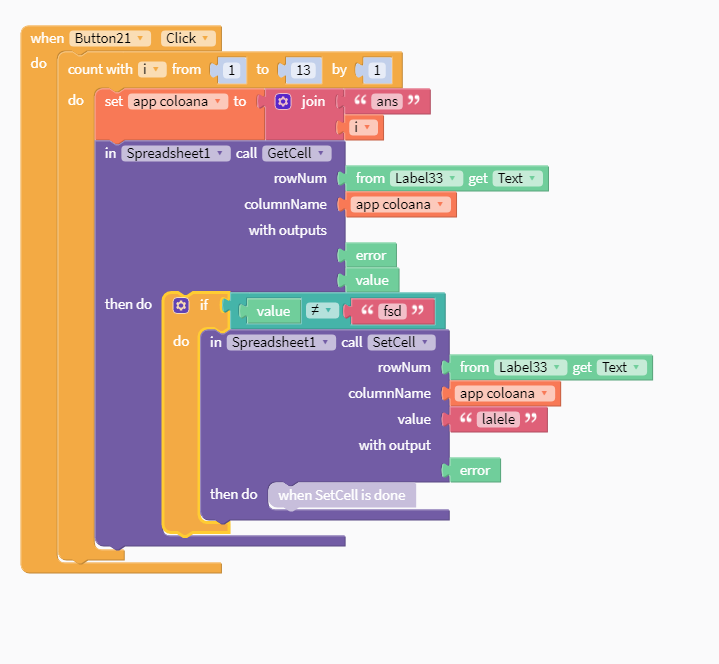
Finally, solved it. The problem was that I had a purple block inside a purple block.
Thank you everybody for your help and patience!
---
### Author:  [@domhnallohanlon](https://community.thunkable.com/u/domhnallohanlon)
#### Post date: [March 11, 2020, 5:30pm UTC](https://community.thunkable.com/t/solved-joining-text-with-a-number-to-use-as-airtable-column-name/508709/13 "2020-03-11T17:30:52Z")
> [@hi1](#):
>
> The problem was that I had a purple block inside a purple block.
Would you mind sharing your solution with us @hi1, just for the benefit of future Thunkers.
---
### Author:  [@tatiang](https://community.thunkable.com/u/tatiang)
#### Post date: [March 11, 2020, 6:14pm UTC](https://community.thunkable.com/t/solved-joining-text-with-a-number-to-use-as-airtable-column-name/508709/14 "2020-03-11T18:14:39Z")
Glad you figured it out!
I’ve changed the thread name to make it more relevant to the issue.
---
### Author:  [@hi1](https://community.thunkable.com/u/hi1)
#### Post date: [March 11, 2020, 7:02pm UTC](https://community.thunkable.com/t/solved-joining-text-with-a-number-to-use-as-airtable-column-name/508709/15 "2020-03-11T19:02:10Z")
This is the solution. It worked for me.

---
### Author:  [@ioannis](https://community.thunkable.com/u/ioannis)
#### Post date: [November 8, 2024, 11:40am UTC](https://community.thunkable.com/t/solved-joining-text-with-a-number-to-use-as-airtable-column-name/508709/16 "2024-11-08T11:40:30Z")