# Simple timer doesn't work
**URL:** https://community.thunkable.com/t/simple-timer-doesnt-work/2586690
**Category:** Feature Requests
**Tags:** timer
**Created:** [September 9, 2023, 11:35pm UTC](https://community.thunkable.com/t/simple-timer-doesnt-work/2586690 "2023-09-09T23:35:52Z")
**Posts on this page:** 8
**Page:** 1
### Author:  [@tatiang](https://community.thunkable.com/u/tatiang)
#### Post date: [September 9, 2023, 11:35pm UTC](https://community.thunkable.com/t/simple-timer-doesnt-work/2586690/1 "2023-09-09T23:35:52Z")
I don’t know why I’ve always struggled with using timers in Thunkable. Something that should be intuitive just doesn’t seem like it to me. I don’t understand why the [documentation](https://docs.thunkable.com/blocks/app-features/timer) doesn’t have a simple example of a countdown timer (or count up timer).
What am I doing wrong? Shouldn’t this setup count up by 1 every second?

And shouldn’t these blocks display 30… 29… 28… etc.? All that happens when I preview is 30…29. I’ve tried Loops enabled or disabled but it doesn’t seem to matter.

---
### Author:  [@steve\_synopsis](https://community.thunkable.com/u/steve_synopsis)
#### Post date: [September 10, 2023, 12:53am UTC](https://community.thunkable.com/t/simple-timer-doesnt-work/2586690/2 "2023-09-10T00:53:47Z")
In my opinion the documentation does not really explain the Timer Time in Seconds.
**If `Count Up` is `true` , returns elapsed time from the Timer’s interval in seconds**
To me, this is not the same as **returns elapsed time from when the timer was started** , so I am not sure what exactly it means. I set the Timer Label Text to the Time in Seconds it only changes between 0 and 1 a few times and then stops.
In the meantime, I followed a tutorial and this works.


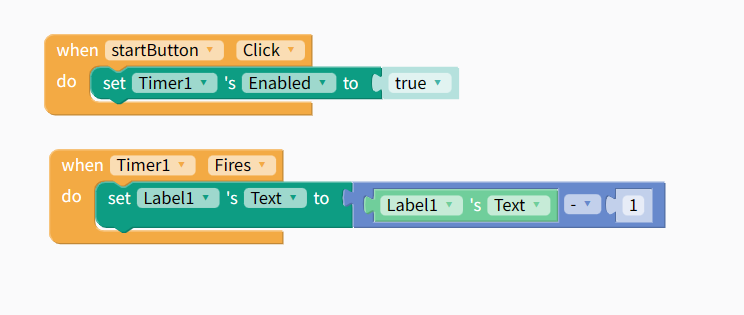
[Video here](https://www.youtube.com/watch?v=R3zPIzcCOYQ)
If the timer is set to enabled, you don’t need the button click as the timer fires as soon as the screen starts.
---
### Author:  [@samclever](https://community.thunkable.com/u/samclever)
#### Post date: [September 10, 2023, 3:57am UTC](https://community.thunkable.com/t/simple-timer-doesnt-work/2586690/3 "2023-09-10T03:57:49Z")
That is how I do it as well. I actually use a variable for the timer behind the scenes a lot. One issue I’ve had is that the timer is clunky meaning after a longer run it tends to be off due to the time it takes to run the process. Unfortunately there isn’t a better way unless you use the timer to repeatedly call ‘seconds since 1970’
---
### Author:  [@tatiang](https://community.thunkable.com/u/tatiang)
#### Post date: [September 10, 2023, 5:07am UTC](https://community.thunkable.com/t/simple-timer-doesnt-work/2586690/4 "2023-09-10T05:07:50Z")
If I enable Loops, the label displays 30, then 29, then 30. And that’s it.
---
### Author:  [@steve\_synopsis](https://community.thunkable.com/u/steve_synopsis)
#### Post date: [September 10, 2023, 1:25pm UTC](https://community.thunkable.com/t/simple-timer-doesnt-work/2586690/5 "2023-09-10T13:25:43Z")
Would be great if we could Thunkable staff to fullt explain the Timer - Time in seconds block.
---
### Author:  [@tatiang](https://community.thunkable.com/u/tatiang)
#### Post date: [September 10, 2023, 5:39pm UTC](https://community.thunkable.com/t/simple-timer-doesnt-work/2586690/6 "2023-09-10T17:39:59Z")
I agree but I also think both the documentation and the component itself need an overhaul. I studied computer science and teach programming and I still don’t find it intuitive to use so what does that say for people with less experience coding?
---
### Author:  [@matt\_conroy](https://community.thunkable.com/u/matt_conroy)
#### Post date: [September 11, 2023, 6:04pm UTC](https://community.thunkable.com/t/simple-timer-doesnt-work/2586690/7 "2023-09-11T18:04:56Z")
@tatiang @steve_synopsis Agreed on the documentation issue, we’ll look into this. I know that team has lots on their plate in terms of new tutorials and the like but I can also suggest this.
Incrementing the value of the variable by -1 is the key to getting this to work.

---
### Author:  [@ioannis](https://community.thunkable.com/u/ioannis)
#### Post date: [November 8, 2024, 1:33pm UTC](https://community.thunkable.com/t/simple-timer-doesnt-work/2586690/8 "2024-11-08T13:33:30Z")