# Search box is not putting Searched Data into Google Sheet
**URL:** https://community.thunkable.com/t/search-box-is-not-putting-searched-data-into-google-sheet/1900944
**Category:** Questions about Thunkable X
**Tags:** beginner
**Created:** [May 29, 2022, 1:36pm UTC](https://community.thunkable.com/t/search-box-is-not-putting-searched-data-into-google-sheet/1900944 "2022-05-29T13:36:39Z")
**Posts on this page:** 11
**Page:** 1
### Author:  [@andos-avlog](https://community.thunkable.com/u/andos-avlog)
#### Post date: [May 29, 2022, 1:36pm UTC](https://community.thunkable.com/t/search-box-is-not-putting-searched-data-into-google-sheet/1900944/1 "2022-05-29T13:36:39Z")
Hi, based on previous projects, I have tried to create a screen which would search across 3 columns in my Google Sheet for any textstring entered into the App’s Search Box (see below)

I have concatenated columns " **MANUFACTURER**", " **MODEL**" & " **CODE**" into column " **SEARCH1**"
I have done this so when a textstring is entered into the App’s **Search** box by the user, the textstring is also be consequentially entered into the GSheet cell ( **MANUCONTENT!H3** ). But this is not happening. (Image below)

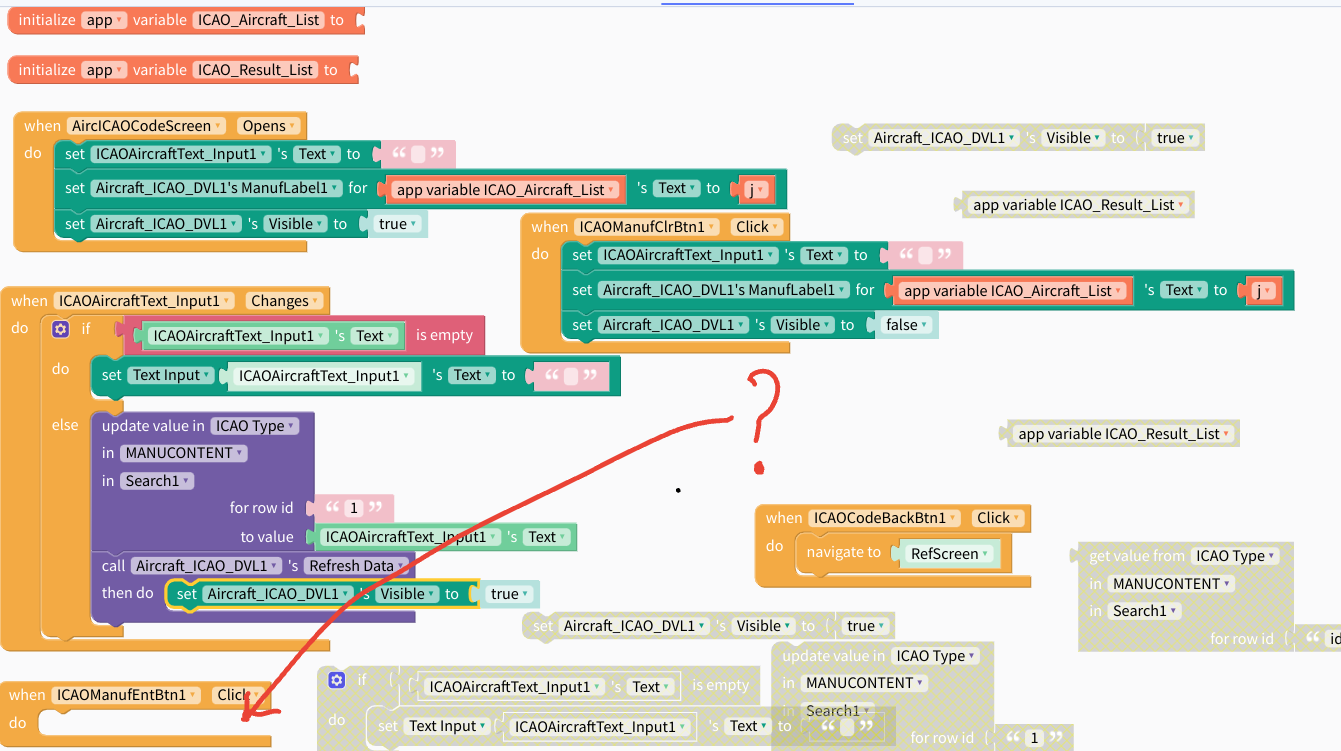
I cannot see anything wrong in my blocks ( below) but I know I have missed something.

Below is what is supposed to happen…!

Then the textstring should appear in the GSheet…
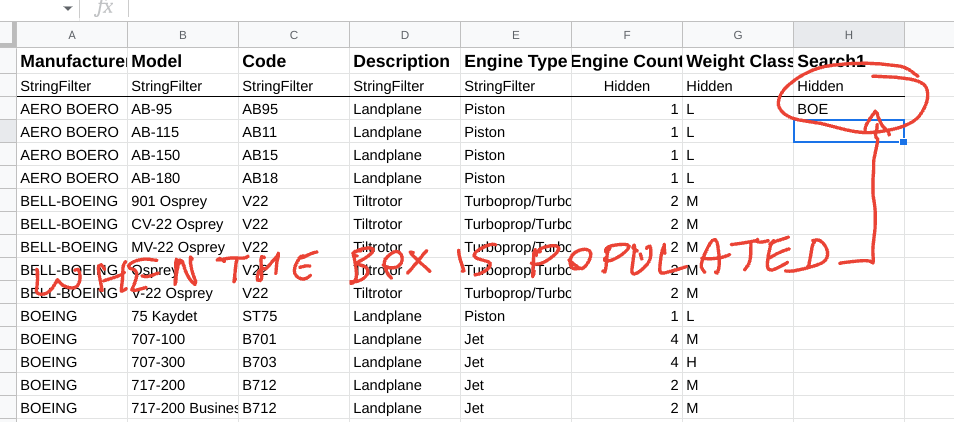
…which will then filter and return the GSheet values from **MANUCONTENT!A3:H** to the DVL ( **Aircraft\_ICAO\_DVL** ).
I have also previously tried using a **List Viewer** but the DVL, for me, feels to be the right solution for my requirements.
Could someone kindly glance over my problem as I am now suffering with “Block Blindness”.
**The project is on my " AircICAOCodeSreen "**
Here is the link to my project:
[https://x.thunkable.com/copy/c3beaf478c7d8f0b7d03b0a89ebe9bf4](https://x.thunkable.com/copy/c3beaf478c7d8f0b7d03b0a89ebe9bf4)
Best regards,
Andos.
---
### Author:  [@muneer](https://community.thunkable.com/u/muneer)
#### Post date: [May 29, 2022, 2:34pm UTC](https://community.thunkable.com/t/search-box-is-not-putting-searched-data-into-google-sheet/1900944/2 "2022-05-29T14:34:40Z")
I have an old project doing a similar that I just tried it and it worked fine.
[https://x.thunkable.com/projectPage/629382f4ba6f1b0012cf088d](https://x.thunkable.com/projectPage/629382f4ba6f1b0012cf088d)
It works with this Google sheet
> **[myList](https://docs.google.com/spreadsheets/d/1qWsz-UobNXvjznJo6d6Vihr_yjGzcCrULeGtEesVZVU/edit?usp=sharing)**
>
> Sheet1
>
> numbers,names
> 11,Muneer,2
> 22,ali-raj
> 33,benoit
> 44,alex
> 47,John
> 98,mark
---
### Author:  [@andos-avlog](https://community.thunkable.com/u/andos-avlog)
#### Post date: [May 29, 2022, 3:15pm UTC](https://community.thunkable.com/t/search-box-is-not-putting-searched-data-into-google-sheet/1900944/3 "2022-05-29T15:15:29Z")
Hi @muneer, that fixed that problem See blocks…!

GSheet Entry

However, I have now discovered that the DVL results are not showing on the App Screen. 😔
My DVL on Design page is set to “visible” (below) and my visibilty in my blocks appear to be ok.

My blocks

All my bindings are correct

…but my App screen is still blank

What am I not seeing?
Best regards,
Andos.
---
### Author:  [@muneer](https://community.thunkable.com/u/muneer)
#### Post date: [May 29, 2022, 7:30pm UTC](https://community.thunkable.com/t/search-box-is-not-putting-searched-data-into-google-sheet/1900944/4 "2022-05-29T19:30:35Z")
You need to check if your DVL is actually bound to the correct Data Source connection.
There are things that you need to consider there.
- If you have disconnected your Google sheet and reconnect it again then you need to reselect the data source in the DVL and rebind all columns.
- If you make a copy of your project and then used a share link to get a copy of the project then all Data Sources will change to local and you have to reconnect again.
- If you change in the custom layout design of the DVL then you need to reconnect again.
---
### Author:  [@andos-avlog](https://community.thunkable.com/u/andos-avlog)
#### Post date: [May 29, 2022, 10:15pm UTC](https://community.thunkable.com/t/search-box-is-not-putting-searched-data-into-google-sheet/1900944/5 "2022-05-29T22:15:50Z")
Hi @muneer, I have disconnected and then reconnected the DVL bindings after re-“syncing” the Source Data. But it still didn’t work so I replaced the variable blocks: text input blocks; and then the DVL blocks and then I finally started seeing the DVL on the App Screen. But, now the app is not returning the filtered data from the GSheet to the App Screen it is just returning the unfiltered data instead. However, the data in the GSheet is filtered. See below:
**Opening Screen**

But no data was present on the GSheet.

I quickly realised that after re-binding the GSheet I hadn’t changed the Source Data to **MANUCONTENT**.
Once that was rectified, I found the Search box in the App was no longer writing to the GSheet.
I then proceeded to recreate all of my blocks and now I am back where I started but now even more confused than before!
Why would this happen if I started again with all new blocks and Source refresh and using the rectified/ amended blocks?
This is the current state of my " **AircICAOCodeScreen** setup below. Can you see anything wrong with it?
**Current opening Screen**

**Again not writing Search textstring to GSheet cell "H3"**

**My current blocks**

Also, shouldn’t the " **When the ICAOAircraftText\_Input changes** block be used?
This project is very important to my App as it is for providing Reference Data.
Best regards,
Andos.
---
### Author:  [@muneer](https://community.thunkable.com/u/muneer)
#### Post date: [May 30, 2022, 4:41pm UTC](https://community.thunkable.com/t/search-box-is-not-putting-searched-data-into-google-sheet/1900944/6 "2022-05-30T16:41:41Z")
It will be very difficult to troubleshoot the project without access to it and its Google sheet.
I understand that you already provided a link. But this **copy** is now old and does not reflect the latest changes. Again, the copy of the project alone does not do a lot as your issue is testing it with the GSheet.
**As a side note:**
I can see that you are setting a variable to **1** and then use this variable to manipulate something with the DVL. This would not work.
---
### Author:  [@andos-avlog](https://community.thunkable.com/u/andos-avlog)
#### Post date: [May 30, 2022, 6:17pm UTC](https://community.thunkable.com/t/search-box-is-not-putting-searched-data-into-google-sheet/1900944/7 "2022-05-30T18:17:38Z")
Thanks @muneer, what should I replace the variable with?
**Here is the link to my GSheet:** I am working from the **MANUCONTENT** tab.
> **[ICAO Type](https://docs.google.com/spreadsheets/d/1uhbjf1NmCrZdT-Lvyx_nenL0x-Fw0GP45zuIjvVIwVs/edit?usp=sharing)**
>
> SEARCH
>
> Manufacturer,Model,Code,Description,Engine Type,Engine Count,Weight Class
> StringFilter,StringFilter,StringFilter,StringFilter,StringFilter,Hidden,Hidden
> 328 SUPPORT SERVICES,Dornier 328JET,J328,Landplane,Piston,2,M
> 3XTRIM,450...
**Here is the latest link to my project:**
[https://x.thunkable.com/copy/8dac58dd4e1e74c563eec5efd7e01e14](https://x.thunkable.com/copy/8dac58dd4e1e74c563eec5efd7e01e14)
Best regards,
Andos.
---
### Author:  [@andos-avlog](https://community.thunkable.com/u/andos-avlog)
#### Post date: [June 8, 2022, 11:32pm UTC](https://community.thunkable.com/t/search-box-is-not-putting-searched-data-into-google-sheet/1900944/8 "2022-06-08T23:32:35Z")
Hi @muneer, I haven’t yet had a response from you to my last reply. However, I had finally got my " **Aircraft ICAO Code Screen** to write to the **MANUCONTENT!H3** cell (in my “Search1” column) this morning. But when I came back to this project this evening there had been a bug in Thunkable which prevented me from further testing my success with the Search issue I had been having. So foolishly, I started to tinker about in my “AircICAOCodeScreen” because as this was the last thing I had altered in my project, I thought it was related. As a result, I have made a mess of everything.
I used your suggestion that you posted earlier in this thread: ([Thunkable](https://x.thunkable.com/projectPage/629382f4ba6f1b0012cf088d)) to help resolve the “ **writing Text Input Searches to my GSheet** ” but it didn’t work until I used the blocks in the “ **when ICAOAircraftText\_Input changes** ” block instead of the “ **When ManufICAOEntBtn1 click** ”. Now that part works flawlessly on the GSheet tab ( **MANUCONTENT** ).
Problem I now have should be simple (-even for me!). I just can’t get the results to display in the App. (below)

As soon as I start to enter a textstring into the **Live Test** text input box (I **CAOAircraftText\_Input1** ). (See below:)

The results are “instantly” shown as I type without the need to use the **Enter button**. 👍
But now when I enter a textstring into the Search/ Text Input box on my mobile phone. The screen does not display any results at all but the data **has been entered** into the Text\_Input box. See below:

"
Could you please look at my blocks below and tell me where I have gone wrong. Like I said earlier, this should be simple but I can’t figure it out.
Best regards,
Andos.
---
### Author:  [@muneer](https://community.thunkable.com/u/muneer)
#### Post date: [June 9, 2022, 12:50pm UTC](https://community.thunkable.com/t/search-box-is-not-putting-searched-data-into-google-sheet/1900944/9 "2022-06-09T12:50:05Z")
I changed this

And removed this from the `opens` block.

It worked fine with me.
---
### Author:  [@andos-avlog](https://community.thunkable.com/u/andos-avlog)
#### Post date: [June 11, 2022, 10:24am UTC](https://community.thunkable.com/t/search-box-is-not-putting-searched-data-into-google-sheet/1900944/10 "2022-06-11T10:24:05Z")
Hi @muneer, I have tried your suggestion which works fine on **Live Test** but is still not showing on my **mobile device**. Any ideas?
Best regards,
Andos.
---
### Author:  [@system](https://community.thunkable.com/u/system)
#### Post date: [September 9, 2022, 10:24am UTC](https://community.thunkable.com/t/search-box-is-not-putting-searched-data-into-google-sheet/1900944/11 "2022-09-09T10:24:09Z")
This topic was automatically closed 90 days after the last reply. New replies are no longer allowed.