# Photo gallery block missing (or I'm not able to find it)
**URL:** https://community.thunkable.com/t/photo-gallery-block-missing-or-im-not-able-to-find-it/1076199
**Category:** Questions about Thunkable X
**Created:** [January 30, 2021, 11:52pm UTC](https://community.thunkable.com/t/photo-gallery-block-missing-or-im-not-able-to-find-it/1076199 "2021-01-30T23:52:22Z")
**Posts on this page:** 9
**Page:** 1
### Author:  [@leannnicole.velasco](https://community.thunkable.com/u/leannnicole.velasco)
#### Post date: [January 30, 2021, 11:52pm UTC](https://community.thunkable.com/t/photo-gallery-block-missing-or-im-not-able-to-find-it/1076199/1 "2021-01-30T23:52:22Z")
Hello everyone, I need help finding the block/element for the photo gallery option. I’ve searched on YouTube but the tutorials were from years ago. I’ve also read some posts here but I just finally decided to ask you guys myself.

I’d appreciate any help. Thank you.
---
### Author:  [@emregoker](https://community.thunkable.com/u/emregoker)
#### Post date: [January 31, 2021, 12:12am UTC](https://community.thunkable.com/t/photo-gallery-block-missing-or-im-not-able-to-find-it/1076199/2 "2021-01-31T00:12:17Z")
You need to use photo library and camera components.
I left an example from my own project for you.

---
### Author:  [@leannnicole.velasco](https://community.thunkable.com/u/leannnicole.velasco)
#### Post date: [January 31, 2021, 12:59am UTC](https://community.thunkable.com/t/photo-gallery-block-missing-or-im-not-able-to-find-it/1076199/3 "2021-01-31T00:59:32Z")
Good day 🙂
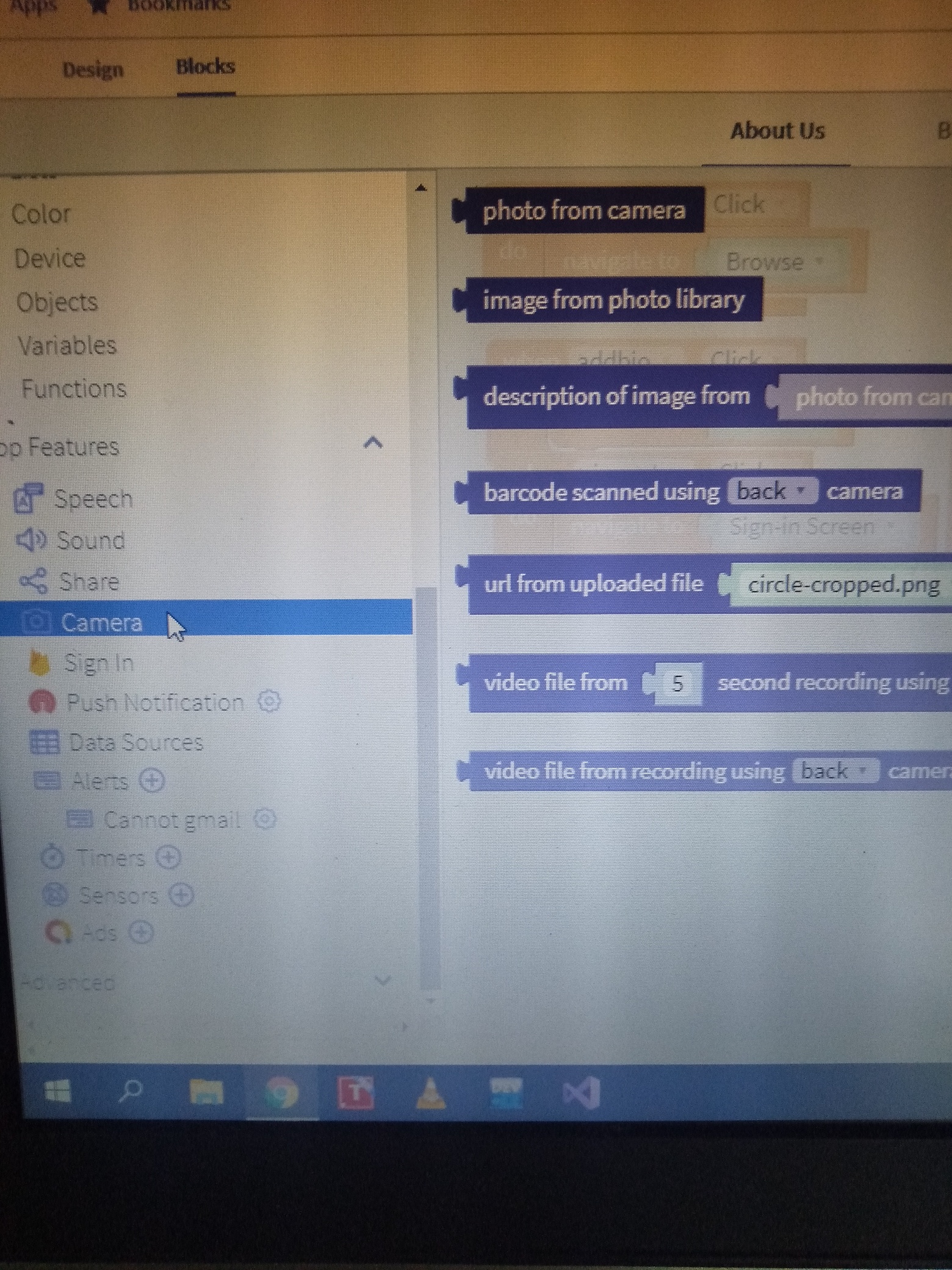
This is all I can see in my components and nothing comes up when I use the search bar. In Blocks, this are the options I see.

---
### Author:  [@tatiang](https://community.thunkable.com/u/tatiang)
#### Post date: [January 31, 2021, 1:21am UTC](https://community.thunkable.com/t/photo-gallery-block-missing-or-im-not-able-to-find-it/1076199/4 "2021-01-31T01:21:59Z")
You’re using the new drag-and-drop interface. In the Camera drawer (as in your screenshot), you have the “photo from camera” block that will allow the user to take a photo and the “image from photo library” button that will allow the user to select a photo from a photo album on their device. That’s it. It’s also important to know that the second button does not currently work.
If you create a project and uncheck “use the new drag-and-drop interface,” you can then use the similar buttons from the legacy interface described here:
[https://docs.thunkable.com/camera](https://docs.thunkable.com/camera)
[https://docs.thunkable.com/photo-library](https://docs.thunkable.com/photo-library)
There is no “photo gallery” block in either interface. To create a photo gallery, you’d have to use a data viewer grid ([Data Viewer Grid - ✕ Docs](https://docs.thunkable.com/data-viewer-grid)) or another method of manually creating a grid of images.
---
### Author:  [@leannnicole.velasco](https://community.thunkable.com/u/leannnicole.velasco)
#### Post date: [January 31, 2021, 1:26am UTC](https://community.thunkable.com/t/photo-gallery-block-missing-or-im-not-able-to-find-it/1076199/5 "2021-01-31T01:26:58Z")
😮 I did create this project with that new option checked. Thank you so much. I was wondering why the interface didn’t look like those in the YouTube videos. For the photo gallery issue, I’ll ask users for a link to their photo instead.
Again, thanks!
---
### Author:  [@emregoker](https://community.thunkable.com/u/emregoker)
#### Post date: [January 31, 2021, 1:40am UTC](https://community.thunkable.com/t/photo-gallery-block-missing-or-im-not-able-to-find-it/1076199/6 "2021-01-31T01:40:42Z")
> [@tatiang](#):
>
> [Thunkable Docs](https://docs.thunkable.com/photo-library)
I guess I thought you were looking for this.
Thanks.
> [@leannnicole.velasco](#):
>
> Fotoğraf galerisi sorunu için, kullanıcılardan bunun yerine kendi fotoğraflarına bir bağlantı isteyeceğim.
Can’t you store user photos in Cloudinary and get links from Airtable?
---
### Author:  [@leannnicole.velasco](https://community.thunkable.com/u/leannnicole.velasco)
#### Post date: [January 31, 2021, 1:51am UTC](https://community.thunkable.com/t/photo-gallery-block-missing-or-im-not-able-to-find-it/1076199/7 "2021-01-31T01:51:58Z")
That was useful @emregoker
I’ve heard of Cloudinary only now. I didn’t get your question. Can you please explain to me? The app is a simple compilation of autobiographies and anyone can add, so I am not able to have a database with photos to choose from.
---
### Author:  [@emregoker](https://community.thunkable.com/u/emregoker)
#### Post date: [January 31, 2021, 2:17am UTC](https://community.thunkable.com/t/photo-gallery-block-missing-or-im-not-able-to-find-it/1076199/8 "2021-01-31T02:17:25Z")
“Cloudinary” is a database site where you can store media files. You can use this in Thunkable, I don’t know where in new design. (Media DB)
The codes I sent above belong to the old version.
In my application, I have the students send us a question photo with these codes.
I keep the links of these photos in Airtable so that the teachers can see them.
---
### Author:  [@ioannis](https://community.thunkable.com/u/ioannis)
#### Post date: [November 8, 2024, 1:29pm UTC](https://community.thunkable.com/t/photo-gallery-block-missing-or-im-not-able-to-find-it/1076199/9 "2024-11-08T13:29:40Z")