# 🎉 New Thunkable ✕ PRO Feature: Publish your Project as a Web App 2020-03-11
**URL:** https://community.thunkable.com/t/new-thunkable-pro-feature-publish-your-project-as-a-web-app-2020-03-11/500455
**Category:** Announcements
**Tags:** new\_release
**Created:** [March 5, 2020, 6:10pm UTC](https://community.thunkable.com/t/new-thunkable-pro-feature-publish-your-project-as-a-web-app-2020-03-11/500455 "2020-03-05T18:10:41Z")
**Posts on this page:** 20
**Page:** 7
### Author:  [@athornock](https://community.thunkable.com/u/athornock)
#### Post date: [April 28, 2020, 4:38pm UTC](https://community.thunkable.com/t/new-thunkable-pro-feature-publish-your-project-as-a-web-app-2020-03-11/500455/135 "2020-04-28T16:38:57Z")
Awesome. Thank you Thunkable team!
---
### Author:  [@eoinparkinson](https://community.thunkable.com/u/eoinparkinson)
#### Post date: [April 28, 2020, 5:00pm UTC](https://community.thunkable.com/t/new-thunkable-pro-feature-publish-your-project-as-a-web-app-2020-03-11/500455/136 "2020-04-28T17:00:46Z")
Hi, excuse my ignorance here as I am not well knowledged in how React web apps are generated, and thanks for your answer.
For a standard website like Wordpress or a website that has a backend you can see data being sent from this endpoint using most browsers, such as chrome, through dev tools. Are our app urls also detectable? Can someone download the app files through the web app and examine them to find api keys or more?
It sounds a lot more difficult to me to download android or iOS apps to examine them.
Again apologies if I came across rude.
Thanks, Eoin.
---
### Author:  [@wei](https://community.thunkable.com/u/wei)
#### Post date: [April 28, 2020, 6:42pm UTC](https://community.thunkable.com/t/new-thunkable-pro-feature-publish-your-project-as-a-web-app-2020-03-11/500455/137 "2020-04-28T18:42:23Z")
Hi @eoinparkinson,
There are a lot of APK file download websites which enable you to download the app and then decompile the apk file to find the keys.
Best,
Wei
---
### Author:  [@wavcow](https://community.thunkable.com/u/wavcow)
#### Post date: [April 30, 2020, 12:12am UTC](https://community.thunkable.com/t/new-thunkable-pro-feature-publish-your-project-as-a-web-app-2020-03-11/500455/138 "2020-04-30T00:12:45Z")
Would really be great to be able to customize the url to maintain consistency with our brand. URL redirect works but it still takes the user “out” of our website by displaying the “thunk” url. At the very least it would be nice to be able to customize the navigation bar colour when the thunk url is loaded. Currently it’s purple which really highlights that the user has left our domain.
---
### Author:  [@ctmorrison](https://community.thunkable.com/u/ctmorrison)
#### Post date: [April 30, 2020, 1:57pm UTC](https://community.thunkable.com/t/new-thunkable-pro-feature-publish-your-project-as-a-web-app-2020-03-11/500455/139 "2020-04-30T13:57:36Z")
I have a couple of apps I use for IoT devices. The user enters the device ID (24 alphanumeric characters) and the API key, roughly 36 alphanumeric characters. I store these locally and having them enter them every time would simply not be acceptable or reasonable. I’m still uncertain if there’s any type of local data storage for mobile web apps. I’d love to go that direction, but need to have some form of storage across application uses.
---
### Author:  [@jared](https://community.thunkable.com/u/jared)
#### Post date: [April 30, 2020, 2:22pm UTC](https://community.thunkable.com/t/new-thunkable-pro-feature-publish-your-project-as-a-web-app-2020-03-11/500455/140 "2020-04-30T14:22:50Z")
> [@ctmorrison](#):
>
> every time would simply not be acceptable or reasonable. I’m still uncertain if there’s any type of local data storage for mobile web apps. I’d love to go that direction, but need
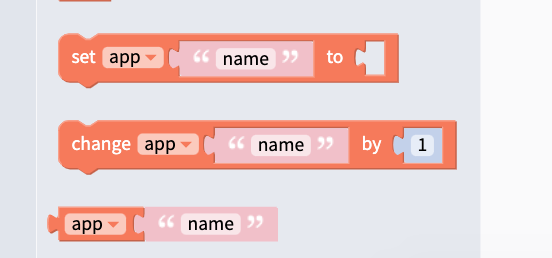
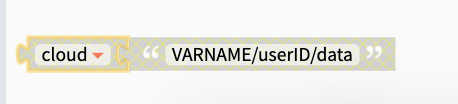
yes. use a cloud variable and a signin system. assign any data stored to the cloud variable with a pathway like this
Cloud VARNAME/userID/Data
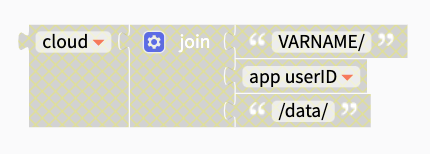
you can use these blocks to create custom pathways within the variables
[ ](https://res.cloudinary.com/behaviorreportcard/image/upload/v1588256427/Screen_Shot_2020-04-30_at_10.18.58_AM_pwhdcv.png)
[ ](https://res.cloudinary.com/behaviorreportcard/image/upload/v1588256426/Screen_Shot_2020-04-30_at_10.19.52_AM_slduhg.png)
get the userID from the firebase login. save the userID from the login blocks to an app variable. use the variable as part of the variable pathway using the text connector blocks
[ ](https://res.cloudinary.com/behaviorreportcard/image/upload/v1588256553/Screen_Shot_2020-04-30_at_10.22.25_AM_wko3vg.png)
. The stored variables are supposed to work. I imagine they get stored as cookies?
@paulmw do you have any input on this?
---
### Author:  [@domhnallohanlon](https://community.thunkable.com/u/domhnallohanlon)
#### Post date: [April 30, 2020, 3:44pm UTC](https://community.thunkable.com/t/new-thunkable-pro-feature-publish-your-project-as-a-web-app-2020-03-11/500455/141 "2020-04-30T15:44:53Z")
> [@ctmorrison](#):
>
> I have a couple of apps I use for IoT devices.
If these are devices that you can connect to over HTTP (or similar) with the Web API component then you should be fine, but just wanted to let you know that BLE is currently [not supported](https://docs.thunkable.com/publish-as-a-web-app-pro#unsupported-components) by our web apps.
It’s not that it _can’t_ be supported, but we just haven’t had a chance to implement it yet.
Thanks!
---
### Author:  [@ctmorrison](https://community.thunkable.com/u/ctmorrison)
#### Post date: [April 30, 2020, 4:23pm UTC](https://community.thunkable.com/t/new-thunkable-pro-feature-publish-your-project-as-a-web-app-2020-03-11/500455/142 "2020-04-30T16:23:27Z")
@domhnallohanlon, Thanks! I communicate with these devices via HTTP and use the Web API. However, the ability to eliminate the need for my Apple Developer and Google Play accounts is appealing if the functionality of my app remains the same.
---
### Author:  [@domhnallohanlon](https://community.thunkable.com/u/domhnallohanlon)
#### Post date: [May 9, 2020, 3:23pm UTC](https://community.thunkable.com/t/new-thunkable-pro-feature-publish-your-project-as-a-web-app-2020-03-11/500455/143 "2020-05-09T15:23:53Z")
3 posts were split to a new topic: [Publish to Web issue with importing from My Screens](https://community.thunkable.com/t/publish-to-web-issue-with-importing-from-my-screens/565176)
---
### Author:  [@maxb](https://community.thunkable.com/u/maxb)
#### Post date: [May 11, 2020, 7:35pm UTC](https://community.thunkable.com/t/new-thunkable-pro-feature-publish-your-project-as-a-web-app-2020-03-11/500455/144 "2020-05-11T19:35:21Z")
Is there a way to see if my app will be shown without bugs if I don’t have pro account?
---
### Author:  [@eoinparkinson](https://community.thunkable.com/u/eoinparkinson)
#### Post date: [May 11, 2020, 7:53pm UTC](https://community.thunkable.com/t/new-thunkable-pro-feature-publish-your-project-as-a-web-app-2020-03-11/500455/145 "2020-05-11T19:53:15Z")
@maxb I believe you can live test it as a Web App.

---
### Author:  [@maxb](https://community.thunkable.com/u/maxb)
#### Post date: [May 11, 2020, 8:01pm UTC](https://community.thunkable.com/t/new-thunkable-pro-feature-publish-your-project-as-a-web-app-2020-03-11/500455/146 "2020-05-11T20:01:37Z")
I thought the same, but it’s a pretty bad representation of what my app actually looks like, so if that’s the web publish, it can’t work for my app
---
### Author:  [@eoinparkinson](https://community.thunkable.com/u/eoinparkinson)
#### Post date: [May 11, 2020, 8:07pm UTC](https://community.thunkable.com/t/new-thunkable-pro-feature-publish-your-project-as-a-web-app-2020-03-11/500455/147 "2020-05-11T20:07:23Z")
Web Apps, as of now, don’t accurately represent what the app will look like on a mobile device. They still function and most of the time work fine.
---
### Author:  [@maxb](https://community.thunkable.com/u/maxb)
#### Post date: [May 11, 2020, 10:20pm UTC](https://community.thunkable.com/t/new-thunkable-pro-feature-publish-your-project-as-a-web-app-2020-03-11/500455/148 "2020-05-11T22:20:50Z")
> [@maxb](#):
>
> but it’s a pretty bad representation of what my app actually looks like, so if that’s the web publish, it can’t work for my app
.
---
### Author:  [@eoinparkinson](https://community.thunkable.com/u/eoinparkinson)
#### Post date: [May 11, 2020, 10:25pm UTC](https://community.thunkable.com/t/new-thunkable-pro-feature-publish-your-project-as-a-web-app-2020-03-11/500455/149 "2020-05-11T22:25:59Z")
The Web App preview is exactly how your web app will look when published as a web app. On the other hand, if you are using web app live test instead of live test on your mobile device then yes they will be different.
---
### Author:  [@maxb](https://community.thunkable.com/u/maxb)
#### Post date: [May 13, 2020, 4:24pm UTC](https://community.thunkable.com/t/new-thunkable-pro-feature-publish-your-project-as-a-web-app-2020-03-11/500455/151 "2020-05-13T16:24:52Z")
I didn’t see this comment,
Thanks this was exactly hat I was looking for. Much appreciated! 🙂
(unfortunately it doesn’t show like on the phone)
---
### Author:  [@awesomeosep1](https://community.thunkable.com/u/awesomeosep1)
#### Post date: [May 14, 2020, 6:08pm UTC](https://community.thunkable.com/t/new-thunkable-pro-feature-publish-your-project-as-a-web-app-2020-03-11/500455/152 "2020-05-14T18:08:28Z")
Is there a way to make the phone simulator on the web app fill the entire browser window? The phone size is really not what I’m looking for. Thanks!
---
### Author:  [@jared](https://community.thunkable.com/u/jared)
#### Post date: [May 14, 2020, 6:54pm UTC](https://community.thunkable.com/t/new-thunkable-pro-feature-publish-your-project-as-a-web-app-2020-03-11/500455/153 "2020-05-14T18:54:41Z")
[ ](https://www.youtube.com/watch?v=q9jiWMQOuq0)
---
### Author:  [@maxb](https://community.thunkable.com/u/maxb)
#### Post date: [May 15, 2020, 7:17pm UTC](https://community.thunkable.com/t/new-thunkable-pro-feature-publish-your-project-as-a-web-app-2020-03-11/500455/154 "2020-05-15T19:17:12Z")
I’m having this problem with the web publish/preview component:

ihave a vertical scrolling list o images that load fine on the phone, from top to bottom but in the webapp I can’t see the top images but only the bottom ones.
Help please
---
### Author:  [@eoinparkinson](https://community.thunkable.com/u/eoinparkinson)
#### Post date: [May 15, 2020, 7:23pm UTC](https://community.thunkable.com/t/new-thunkable-pro-feature-publish-your-project-as-a-web-app-2020-03-11/500455/155 "2020-05-15T19:23:11Z")
@maxb do you have the containers in which the images are in set to **Fit Contents**? This goes for every container, especially the container which has scrollable set to true.
(edit)
Upon looking into this, with images set to 150x150px and all appropriate containers set to fit contents, I also see the same issue. This goes for MWA and RWA.
[https://x.thunkable.com/projects/5ebeeca305e07d4bae09cba3/2edb7229-b523-4e4e-aae5-6facb010f0bd/designer](https://x.thunkable.com/projects/5ebeeca305e07d4bae09cba3/2edb7229-b523-4e4e-aae5-6facb010f0bd/designer)
[Previous page](https://community.thunkable.com/t/new-thunkable-pro-feature-publish-your-project-as-a-web-app-2020-03-11/500455.md?page=6)
[Next page](https://community.thunkable.com/t/new-thunkable-pro-feature-publish-your-project-as-a-web-app-2020-03-11/500455.md?page=8)