# Multiple markers on map from google sheet data
**URL:** https://community.thunkable.com/t/multiple-markers-on-map-from-google-sheet-data/2907094
**Category:** Maps
**Tags:** beginner
**Created:** [March 21, 2024, 12:16pm UTC](https://community.thunkable.com/t/multiple-markers-on-map-from-google-sheet-data/2907094 "2024-03-21T12:16:04Z")
**Posts on this page:** 8
**Page:** 1
### Author:  [@nuuzonessqnzvv](https://community.thunkable.com/u/nuuzonessqnzvv)
#### Post date: [March 21, 2024, 12:16pm UTC](https://community.thunkable.com/t/multiple-markers-on-map-from-google-sheet-data/2907094/1 "2024-03-21T12:16:04Z")
Hi Thunkers,
I have searched and not found a solution so hoping someone can help me out.
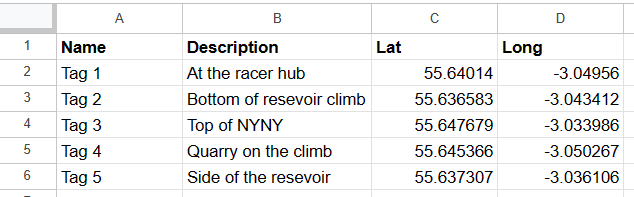
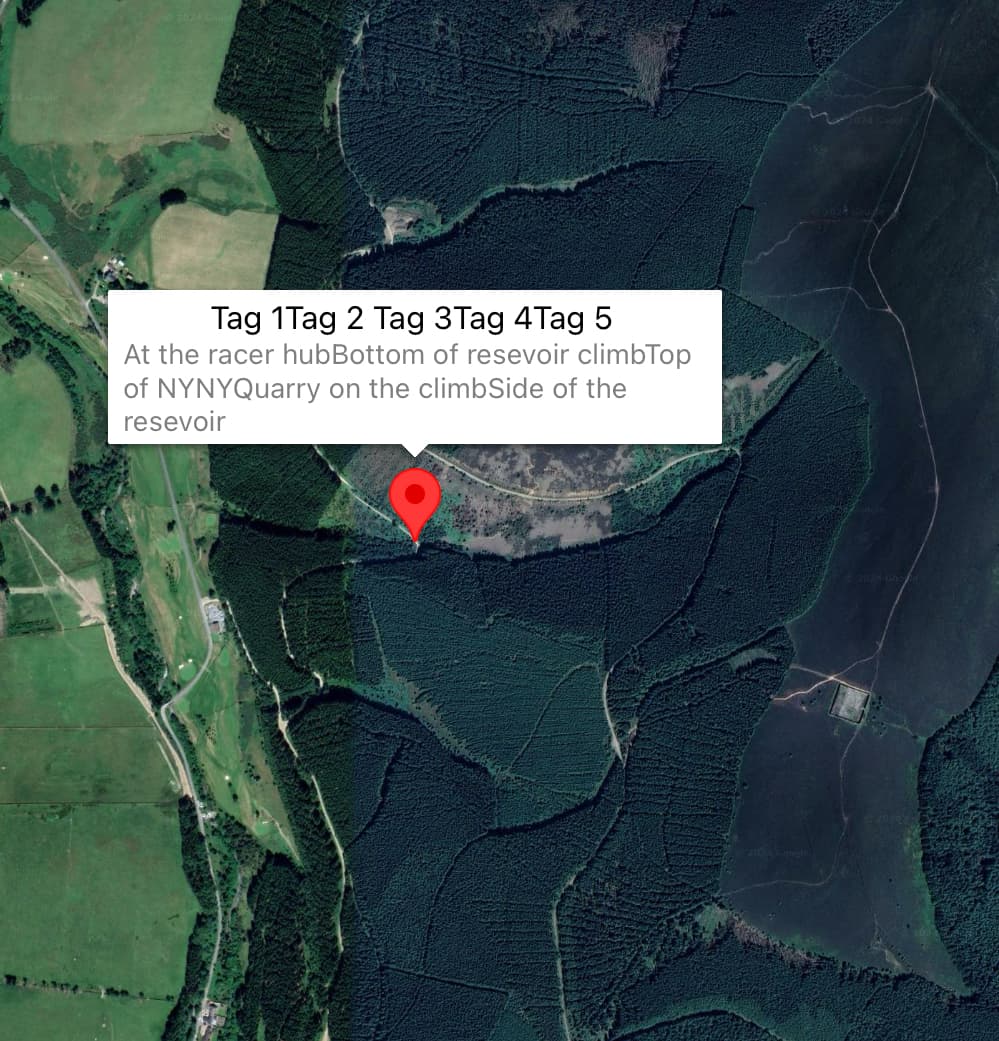
I am trying to set multiple markers from a google sheet data set. I’ve attached an image below showing my current setup and the data sheet. However, when I live test the app, it places only one marker using lat/long data from Tag 1, but places all the names and descriptions under that same marker.
I would ideally like it to loop through the data set row by row, displaying the five markers.

---
### Author:  [@ioannis](https://community.thunkable.com/u/ioannis)
#### Post date: [March 21, 2024, 3:52pm UTC](https://community.thunkable.com/t/multiple-markers-on-map-from-google-sheet-data/2907094/2 "2024-03-21T15:52:29Z")
Hello @nuuzonessqnzvv
Welcome to the community
To solve this issue you will need to remove the list blocks and connect directly the variable in the “in list get” block

---
### Author:  [@nuuzonessqnzvv](https://community.thunkable.com/u/nuuzonessqnzvv)
#### Post date: [March 21, 2024, 5:41pm UTC](https://community.thunkable.com/t/multiple-markers-on-map-from-google-sheet-data/2907094/3 "2024-03-21T17:41:46Z")
That worked a treat, thank you @ioannis
When clicking markers it navigates to a QR scanner screen. (Seen below)
Is there anyway to assign a variable or number to each marker, so that when submitting data in the QR scanner screen I know which marker it came from?

---
### Author:  [@ioannis](https://community.thunkable.com/u/ioannis)
#### Post date: [March 22, 2024, 7:45pm UTC](https://community.thunkable.com/t/multiple-markers-on-map-from-google-sheet-data/2907094/4 "2024-03-22T19:45:52Z")
Hello @nuuzonessqnzvv 👋
I am glad that it worked for you!
To get the coordinates when you click on the marker you can save the latitude and longitude on the app variable before you navigate to the next screen. Here is an example:

---
### Author:  [@nuuzonessqnzvv](https://community.thunkable.com/u/nuuzonessqnzvv)
#### Post date: [March 26, 2024, 5:36pm UTC](https://community.thunkable.com/t/multiple-markers-on-map-from-google-sheet-data/2907094/5 "2024-03-26T17:36:14Z")
Hi @ioannis
Thanks for your help but I think there may have been a misunderstanding with my question.
I need help assigning a name/title E.g. Tag 1, Tag 2 etc… to each of the markers. Right now when pressing a marker it shows a title/name, description, lat & long coordinates from a Google sheet, then takes them to the ‘QR Scanner’ screen.
Upon a successful scan in the ‘QR Scanner’ screen, I would like to send the title/name of the marker into a the data viewer in the ‘Tag Times’ screen, so it will show who scanned which marker at a specific time. This is connected to another Google sheet.
I have attached a Thunkable project link below. If you have time it may help to identify a solution. Thank you appreciate the help so far 🙂
[https://x.thunkable.com/projectPage/65f095eb0ed673fc836de29d](https://x.thunkable.com/projectPage/65f095eb0ed673fc836de29d)
---
### Author:  [@maurizio.polverini89](https://community.thunkable.com/u/maurizio.polverini89)
#### Post date: [March 27, 2024, 8:03am UTC](https://community.thunkable.com/t/multiple-markers-on-map-from-google-sheet-data/2907094/6 "2024-03-27T08:03:43Z")
Hello,
I recently had the chance to create something very similar with my app.
I found a nice walkaround that might help you in this case.
I used a free api fro [quickchart.io](http://quickchart.io) that allows the creation on customized QR Codes.
You can generate your customized QR Code with the link [https://quickchart.io/qr?text=VARIABLE](https://quickchart.io/qr?text=VARIABLE)
Once scanned from your app, it’ll response a “VARIABLE” that you can use to add another row.
Example.
- User click on a Tag1 mark
- the app creates a qr code using [https://quickchart.io/qr?text=Tag1](https://quickchart.io/qr?text=Tag1) “Tag1 as variable”
- If QR code scanned contain any text from column “Name” from your Google Sheets, then action
- If QR code scanned = Tag1, then action
I hope it helps
---
### Author:  [@nuuzonessqnzvv](https://community.thunkable.com/u/nuuzonessqnzvv)
#### Post date: [March 28, 2024, 10:12pm UTC](https://community.thunkable.com/t/multiple-markers-on-map-from-google-sheet-data/2907094/7 "2024-03-28T22:12:53Z")
Hi @maurizio.polverini89
Thank you for your response, super helpful.
---
### Author:  [@maurizio.polverini89](https://community.thunkable.com/u/maurizio.polverini89)
#### Post date: [March 29, 2024, 8:04am UTC](https://community.thunkable.com/t/multiple-markers-on-map-from-google-sheet-data/2907094/8 "2024-03-29T08:04:45Z")
You’re welcome, glad it helped