# How to increment Y value of an image list?
**URL:** https://community.thunkable.com/t/how-to-increment-y-value-of-an-image-list/2149888
**Category:** Questions about Thunkable X
**Tags:** beginner, image
**Created:** [November 25, 2022, 6:58pm UTC](https://community.thunkable.com/t/how-to-increment-y-value-of-an-image-list/2149888 "2022-11-25T18:58:39Z")
**Posts on this page:** 6
**Page:** 1
### Author:  [@ana2d3d](https://community.thunkable.com/u/ana2d3d)
#### Post date: [November 25, 2022, 6:58pm UTC](https://community.thunkable.com/t/how-to-increment-y-value-of-an-image-list/2149888/1 "2022-11-25T18:58:39Z")
Hello, Thunkers!
I’m trying to list a group of Images in a scrollable screen and would like to make an increment in Y from 600px just like in the sample ( I made it manually just to try) but the list is much longer and I’ll use tables/database.
Each image is a square ± 300x300px .
I know there are variables to consider…
Any help is welcome. Thanks in advance!
[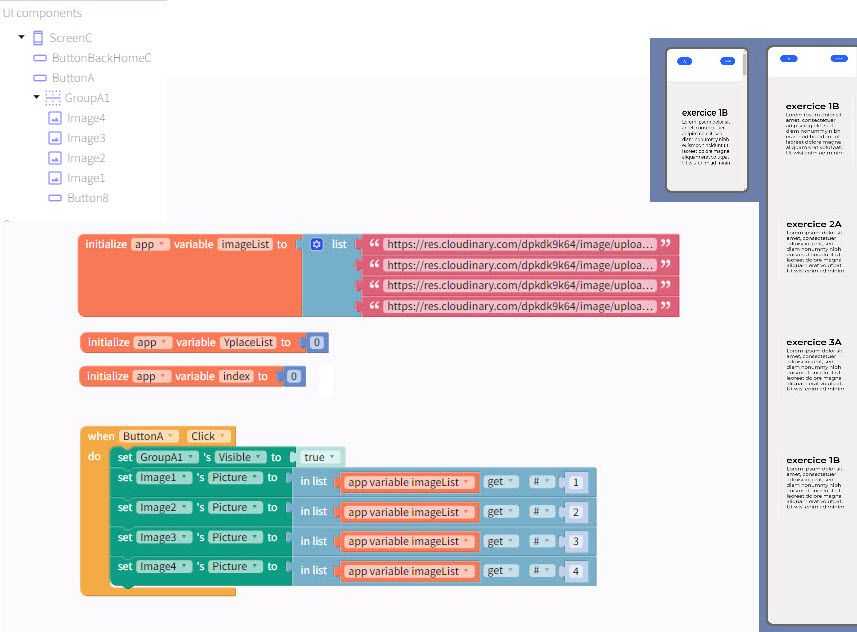 ](https://res.cloudinary.com/dpkdk9k64/image/upload/v1669402505/exerciseListTeste_mbdtrz.jpg)
---
### Author:  [@tatiang](https://community.thunkable.com/u/tatiang)
#### Post date: [November 25, 2022, 7:23pm UTC](https://community.thunkable.com/t/how-to-increment-y-value-of-an-image-list/2149888/2 "2022-11-25T19:23:38Z")
Use a Data Viewer List or (Data Viewer Grid) for this. If needed, make a custom layout with your 300 pixel image and the necessary margins for your components.
---
### Author:  [@ana2d3d](https://community.thunkable.com/u/ana2d3d)
#### Post date: [November 28, 2022, 4:37pm UTC](https://community.thunkable.com/t/how-to-increment-y-value-of-an-image-list/2149888/3 "2022-11-28T16:37:30Z")
Hello again!
I’ve tried what you suggested and is really what I wanted. Thanks!
But I’ve got a problem:
It only works with Thunkable and I have no choice to choose the custom layout with Thunkable X.
Am I missing something? For me working with drag and drop is much easier.
Thanks in advance!
---
### Author:  [@ana2d3d](https://community.thunkable.com/u/ana2d3d)
#### Post date: [November 28, 2022, 4:46pm UTC](https://community.thunkable.com/t/how-to-increment-y-value-of-an-image-list/2149888/4 "2022-11-28T16:46:56Z")
Sorry! I confused myself…Is Thunkable X but I must choose a project without drag-and-drop screens.
---
### Author:  [@tatiang](https://community.thunkable.com/u/tatiang)
#### Post date: [November 28, 2022, 5:00pm UTC](https://community.thunkable.com/t/how-to-increment-y-value-of-an-image-list/2149888/5 "2022-11-28T17:00:57Z")
You can use custom layouts with StP or DnD.
---
### Author:  [@system](https://community.thunkable.com/u/system)
#### Post date: [February 26, 2023, 5:01pm UTC](https://community.thunkable.com/t/how-to-increment-y-value-of-an-image-list/2149888/6 "2023-02-26T17:01:27Z")
This topic was automatically closed 90 days after the last reply. New replies are no longer allowed.