# How to create Dynamic List View for display all json data
**URL:** https://community.thunkable.com/t/how-to-create-dynamic-list-view-for-display-all-json-data/36734
**Category:** Questions about Thunkable X
**Created:** [July 20, 2018, 12:42pm UTC](https://community.thunkable.com/t/how-to-create-dynamic-list-view-for-display-all-json-data/36734 "2018-07-20T12:42:03Z")
**Posts on this page:** 14
**Page:** 1
### Author:  [@Milan\_Ghevariya](https://community.thunkable.com/u/Milan_Ghevariya)
#### Post date: [July 20, 2018, 12:42pm UTC](https://community.thunkable.com/t/how-to-create-dynamic-list-view-for-display-all-json-data/36734/1 "2018-07-20T12:42:03Z")
Hello freinds,
How can i create list view that print all data of json get in list view ?
please solve my problem friends …
---
### Author:  [@User81](https://community.thunkable.com/u/User81)
#### Post date: [July 20, 2018, 1:02pm UTC](https://community.thunkable.com/t/how-to-create-dynamic-list-view-for-display-all-json-data/36734/2 "2018-07-20T13:02:16Z")
Hi Milan,
welcome to the community. You may have found the object-blocks and the listviewer component. Can you post a screenshot, what you have done already?
cheers,
User81
---
### Author:  [@actech](https://community.thunkable.com/u/actech)
#### Post date: [July 20, 2018, 3:52pm UTC](https://community.thunkable.com/t/how-to-create-dynamic-list-view-for-display-all-json-data/36734/3 "2018-07-20T15:52:03Z")
Hi,
Below is a basic example for a simple JSON.
```
{
"menu": "File",
"commands": "Open",
"title": "Новый",
"action":"CreateDoc"
}
```

Alex
---
### Author:  [@Milan\_Ghevariya](https://community.thunkable.com/u/Milan_Ghevariya)
#### Post date: [July 21, 2018, 6:19am UTC](https://community.thunkable.com/t/how-to-create-dynamic-list-view-for-display-all-json-data/36734/4 "2018-07-21T06:19:54Z")
Actech how to i contact you, i need it .
---
### Author:  [@User81](https://community.thunkable.com/u/User81)
#### Post date: [July 21, 2018, 7:32am UTC](https://community.thunkable.com/t/how-to-create-dynamic-list-view-for-display-all-json-data/36734/5 "2018-07-21T07:32:57Z")
what exactly do you need?
We need an example of your JSON response.
It should look like the text, which actech posted
---
### Author:  [@actech](https://community.thunkable.com/u/actech)
#### Post date: [July 21, 2018, 7:34am UTC](https://community.thunkable.com/t/how-to-create-dynamic-list-view-for-display-all-json-data/36734/6 "2018-07-21T07:34:45Z")

---
### Author:  [@Milan\_Ghevariya](https://community.thunkable.com/u/Milan_Ghevariya)
#### Post date: [July 21, 2018, 11:06am UTC](https://community.thunkable.com/t/how-to-create-dynamic-list-view-for-display-all-json-data/36734/7 "2018-07-21T11:06:31Z")
Hello User81 ,
you ask me to my json link in our last conversation, so i give you my json link below :
[https://suratimasti.com/Love/Love\_shayri\_api/json\_test](https://suratimasti.com/Love/Love_shayri_api/json_test)
test and please give me best option for this.
---
### Author:  [@actech](https://community.thunkable.com/u/actech)
#### Post date: [July 21, 2018, 11:27am UTC](https://community.thunkable.com/t/how-to-create-dynamic-list-view-for-display-all-json-data/36734/8 "2018-07-21T11:27:28Z")
Hi,
Here are two ways to solve your problem:
[https://x.thunkable.com/projects/5b53152859e51a188b6b060d/project/properties/designer/](https://x.thunkable.com/projects/5b53152859e51a188b6b060d/project/properties/designer/)
---
### Author:  [@User81](https://community.thunkable.com/u/User81)
#### Post date: [July 21, 2018, 11:37am UTC](https://community.thunkable.com/t/how-to-create-dynamic-list-view-for-display-all-json-data/36734/9 "2018-07-21T11:37:16Z")
[
{“cat\_id”:“1”,“category”:“Love”,“status”:“1”},
{“cat\_id”:“2”,“category”:“Romantic”,“status”:“1”},
{“cat\_id”:“3”,“category”:“Friendship”,“status”:“1”},
{“cat\_id”:“4”,“category”:“Attitude”,“status”:“1”}
]
this is a so-called JSON-string. In thunkable X you can import this string to build an object.
the component i in the object section on the left.
Once you have build the object, you can address all values and keys in it. the [] shows an array, so you have to select a number of an array.
the items in the list are separated by commas.
to read a property, you use the commponent in the object section.
---
### Author:  [@User81](https://community.thunkable.com/u/User81)
#### Post date: [July 21, 2018, 11:42am UTC](https://community.thunkable.com/t/how-to-create-dynamic-list-view-for-display-all-json-data/36734/10 "2018-07-21T11:42:32Z")
The following blocks should show the word Friendship on Label24

---
### Author:  [@orbify](https://community.thunkable.com/u/orbify)
#### Post date: [April 10, 2019, 8:46pm UTC](https://community.thunkable.com/t/how-to-create-dynamic-list-view-for-display-all-json-data/36734/11 "2019-04-10T20:46:08Z")
Hi Everyone!
I am having the most frustrating time trying to get properties from JSON objects - especially as it relates to Firebase. I thought I would post in this thread, because ultimately, I want to create a List View with the content that I pull from Firebase.
Here is a sample of my Firebase database structure (I am more than willing to take suggestions for more appropriate database JSON structuring - if anyone has suggestions).

JSON View shown below:
“Sensors” : {
“DB:09:27:8B:8D:1B” : {
“description” : “Location 2”,
“macaddress” : “DB:09:27:8B:8D:1B”,
“sensorname” : “Sensor 2”
},
“DB:09:27:8B:8D:9B” : {
“description” : “Location 1”,
“macaddress” : “DB:09:27:8B:8D:9B”,
“sensorname” : “Sensor 1”
}
},
Long-story short, I am adding in sensors via QR code web API which pulls their MAC address. Each sensor than has a unique MAC address code associated with it.
I am trying to do 2 tasks:
1. Get a list of all sensors via their MAC address. (No idea how to start to do that one since the names are “variable”).
2. Get the properties such as “description” & “sensorname” under each of these unique sensor ID MAC addresses.
With the following blocks, I can get to the “sensorname” - but that is with my pre-populating the MAC address:
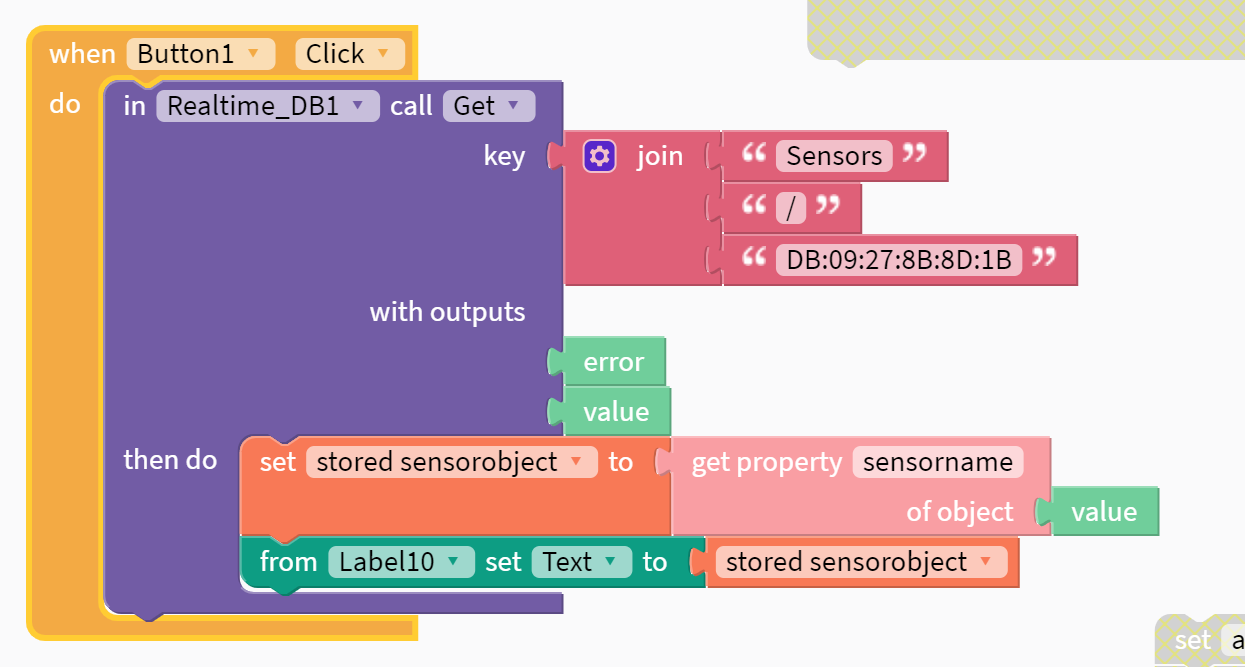
Is there a way to get this dynamically?
Ultimately, I want to get to a list view with this information contained in the Firebase database.
Any suggestions that anyone has - will help tremendously. Please post example blocks if you can. I have spent 2-3 days searching forms and trying different options without any luck.
I even tried the above example of the poster - these blocks fail to output a result (what am I doing that is fundamentally wrong?):

Thank you all!
---
### Author:  [@orbify](https://community.thunkable.com/u/orbify)
#### Post date: [April 18, 2019, 6:14pm UTC](https://community.thunkable.com/t/how-to-create-dynamic-list-view-for-display-all-json-data/36734/12 "2019-04-18T18:14:43Z")
Anyone can help?
---
### Author:  [@TheGenius](https://community.thunkable.com/u/TheGenius)
#### Post date: [April 14, 2020, 7:29pm UTC](https://community.thunkable.com/t/how-to-create-dynamic-list-view-for-display-all-json-data/36734/13 "2020-04-14T19:29:50Z")
I am also looking for same help. Same scenario in different kind of app. No one is able to help from experts. What to do?
---
### Author:  [@ioannis](https://community.thunkable.com/u/ioannis)
#### Post date: [November 8, 2024, 11:39am UTC](https://community.thunkable.com/t/how-to-create-dynamic-list-view-for-display-all-json-data/36734/14 "2024-11-08T11:39:02Z")