# DataViewerList Filter by user using Airtable and WebAPI
**URL:** https://community.thunkable.com/t/dataviewerlist-filter-by-user-using-airtable-and-webapi/4107946
**Category:** Questions about Thunkable X
**Tags:** beginner, data-viewer
**Created:** [November 18, 2025, 7:50pm UTC](https://community.thunkable.com/t/dataviewerlist-filter-by-user-using-airtable-and-webapi/4107946 "2025-11-18T19:50:10Z")
**Posts on this page:** 4
**Page:** 1
### Author:  [@justtreasurescdj5ps](https://community.thunkable.com/u/justtreasurescdj5ps)
#### Post date: [November 18, 2025, 7:50pm UTC](https://community.thunkable.com/t/dataviewerlist-filter-by-user-using-airtable-and-webapi/4107946/1 "2025-11-18T19:50:10Z")
Hi there,
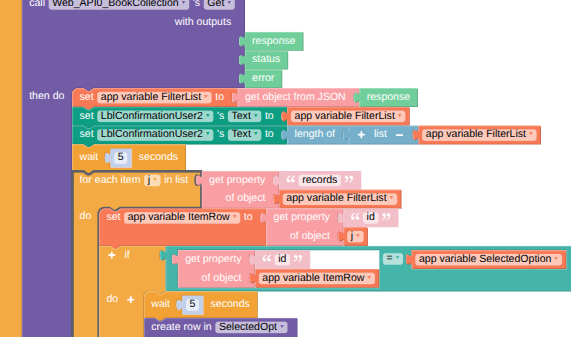
I am having an issue with my Data Viewer List. I am using WebAPI with a filter on user. My DataViewerList was displaying all records despite my API filter. So I reviewed some post and some have used another local table. So I gave this a try. I am still using my main DB with Airtable that stores all my data and the local table as a temporary table. The issue is the record I get from the API returns as (1) record. But based on the Airtable DB there are 4 records associated with this user. Are you able to tell me where my code has taken the wrong turn? I am only returning 1 record each time and the same record is written to my DataViewer LIist. My filtered list has 4 record Id’s from the API that start with recXXXXXX.
---
### Author:  [@ioannis](https://community.thunkable.com/u/ioannis)
#### Post date: [November 21, 2025, 10:53pm UTC](https://community.thunkable.com/t/dataviewerlist-filter-by-user-using-airtable-and-webapi/4107946/2 "2025-11-21T22:53:32Z")
Hi @justtreasurescdj5ps
I suggest you use the filter view and not the Web API
---
### Author:  [@justtreasurescdj5ps](https://community.thunkable.com/u/justtreasurescdj5ps)
#### Post date: [November 23, 2025, 10:08pm UTC](https://community.thunkable.com/t/dataviewerlist-filter-by-user-using-airtable-and-webapi/4107946/3 "2025-11-23T22:08:23Z")
Hello,
Thank you for your response. I actually used the WebAPI to pull my filtered record set and used a (1) temp table. I don’t know if it will work but wanted to see if this might be an option. These code blocks are for Screen1 of the DataViewList and I am not sure if the data will align on Screen 2 of the DataViewList..
I am using the Title Subtitle –\> display
---
### Author:  [@system](https://community.thunkable.com/u/system)
#### Post date: [February 21, 2026, 10:08pm UTC](https://community.thunkable.com/t/dataviewerlist-filter-by-user-using-airtable-and-webapi/4107946/4 "2026-02-21T22:08:39Z")
This topic was automatically closed 90 days after the last reply. New replies are no longer allowed.