# Can you style date input?
**URL:** https://community.thunkable.com/t/can-you-style-date-input/3695344
**Category:** Questions about Thunkable X
**Created:** [March 28, 2025, 2:56am UTC](https://community.thunkable.com/t/can-you-style-date-input/3695344 "2025-03-28T02:56:06Z")
**Posts on this page:** 11
**Page:** 1
### Author:  [@theague](https://community.thunkable.com/u/theague)
#### Post date: [March 28, 2025, 2:56am UTC](https://community.thunkable.com/t/can-you-style-date-input/3695344/1 "2025-03-28T02:56:06Z")
Looking at the screen shot below, the hints in the text input fields all have the same style and a slight indent. Is there any way to modify the styling of the date input field so that it looks the same as the rest? Even when I enter text into the other input fields, the indent stays.. so this one field really stands out.
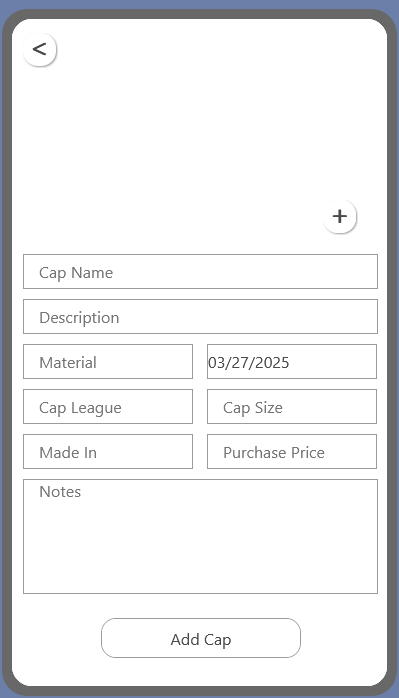
---
### Author:  [@krish05](https://community.thunkable.com/u/krish05)
#### Post date: [March 28, 2025, 8:27pm UTC](https://community.thunkable.com/t/can-you-style-date-input/3695344/2 "2025-03-28T20:27:23Z")
Welcome to Thunkable!
While there is very limited customization of text input’s hint, other than font, size, and text, possibly you can append it by adding a couple of space characters in front.
```auto
// current datestamp
03/27/2025
// new datastamp
03/27/2025
```
An indent is primarily around 5 spaces, but customize to your liking.
```auto
set TextInput1 text:
join:
" ",
app variable date
```
---
### Author:  [@theague](https://community.thunkable.com/u/theague)
#### Post date: [March 28, 2025, 8:44pm UTC](https://community.thunkable.com/t/can-you-style-date-input/3695344/3 "2025-03-28T20:44:43Z")
Hey thanks for the reply. I’m still very new to Thunkable so I’m not sure where I would make that customization? Explain like I’m 5? 😅
---
### Author:  [@krish05](https://community.thunkable.com/u/krish05)
#### Post date: [March 28, 2025, 9:21pm UTC](https://community.thunkable.com/t/can-you-style-date-input/3695344/4 "2025-03-28T21:21:02Z")
Haha, no worries, I’ll help you out!
Here are the necessary blocks you need (assuming you have a date variable):

If you **don’t** have a variable, use whatever boolean block you used to add _underneath the indent_. Hope this helps!
---
### Author:  [@theague](https://community.thunkable.com/u/theague)
#### Post date: [March 28, 2025, 9:44pm UTC](https://community.thunkable.com/t/can-you-style-date-input/3695344/5 "2025-03-28T21:44:29Z")
I don’t have a date variable. It is just the standard Date Input under the Input section when building out the UI.
There is no “text” option for a date input.

---
### Author:  [@krish05](https://community.thunkable.com/u/krish05)
#### Post date: [March 29, 2025, 5:47pm UTC](https://community.thunkable.com/t/can-you-style-date-input/3695344/6 "2025-03-29T17:47:57Z")
Was actually hinting to these blocks:

They have a date feature so you can change it to days or months.
---
### Author:  [@theague](https://community.thunkable.com/u/theague)
#### Post date: [March 29, 2025, 9:32pm UTC](https://community.thunkable.com/t/can-you-style-date-input/3695344/7 "2025-03-29T21:32:06Z")
current time isn’t actually what I’m after. I want the user to be able to select a date, usually in the past. In this case, it’s to track when something was purchased.
---
### Author:  [@krish05](https://community.thunkable.com/u/krish05)
#### Post date: [March 30, 2025, 3:30am UTC](https://community.thunkable.com/t/can-you-style-date-input/3695344/8 "2025-03-30T03:30:43Z")
Exactly; you can store this in a Data Source, like Google Sheets or Airtable. And then you can pull it out at any time.
---
### Author:  [@theague](https://community.thunkable.com/u/theague)
#### Post date: [March 30, 2025, 9:40pm UTC](https://community.thunkable.com/t/can-you-style-date-input/3695344/9 "2025-03-30T21:40:56Z")
I think we have deviated from my question. I have already connected a data source where this information will be stored. with this question, I am _only_ after a way to format or style the input box so it matches the rest of the input fields.

---
### Author:  [@krish05](https://community.thunkable.com/u/krish05)
#### Post date: [March 31, 2025, 9:11pm UTC](https://community.thunkable.com/t/can-you-style-date-input/3695344/10 "2025-03-31T21:11:36Z")
# **Drag and Drop builder:**
By default, Date Inputs are transparent, so you have to manually add a background and everything. Instead, try adding a dummy button that has no code to run, then place your date input a little to the right.
# **Snap to Place builder:**
Seems there’s not really an easy way to build this, so if you were to use a column or row component, you’d have to place _another row component_ inside your existing component. Then you’d have to add a dummy button, and centralize your date input.
---
### Author:  [@system](https://community.thunkable.com/u/system)
#### Post date: [June 29, 2025, 9:13pm UTC](https://community.thunkable.com/t/can-you-style-date-input/3695344/12 "2025-06-29T21:13:36Z")
This topic was automatically closed 90 days after the last reply. New replies are no longer allowed.