# Accessing Firebase cloud variables in thunkable
**URL:** https://community.thunkable.com/t/accessing-firebase-cloud-variables-in-thunkable/2237157
**Category:** Questions about Thunkable X
**Tags:** firebase, beginner, cloud-variable
**Created:** [January 23, 2023, 4:26pm UTC](https://community.thunkable.com/t/accessing-firebase-cloud-variables-in-thunkable/2237157 "2023-01-23T16:26:01Z")
**Posts on this page:** 7
**Page:** 1
### Author:  [@marcanthonychristoph](https://community.thunkable.com/u/marcanthonychristoph)
#### Post date: [January 23, 2023, 4:26pm UTC](https://community.thunkable.com/t/accessing-firebase-cloud-variables-in-thunkable/2237157/1 "2023-01-23T16:26:02Z")
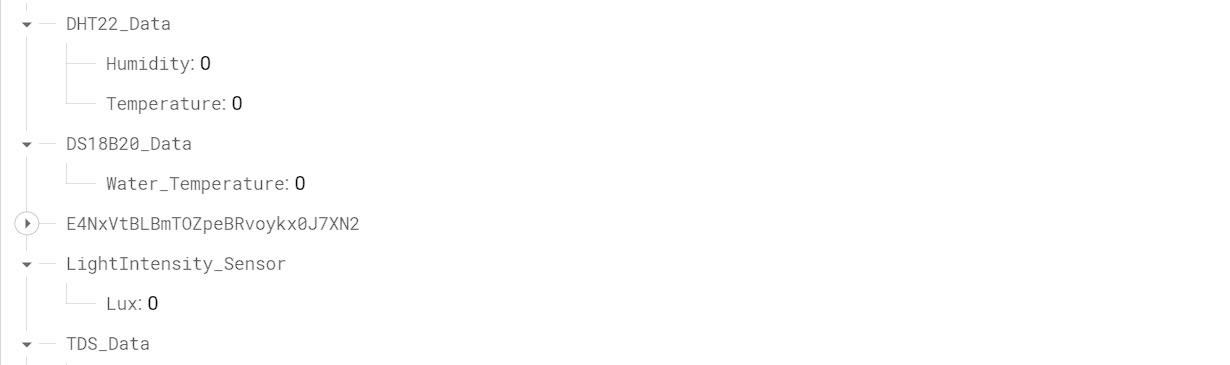
Hi! I’m fairly new to Thunkable. I’m working on a project in which I’m calling variables from my database but I’m quite stuck on how to make it appear on my application, any help would be appreciated.
(I’ve already connected the database to Thunkable)

---
### Author:  [@tatiang](https://community.thunkable.com/u/tatiang)
#### Post date: [January 23, 2023, 4:35pm UTC](https://community.thunkable.com/t/accessing-firebase-cloud-variables-in-thunkable/2237157/2 "2023-01-23T16:35:43Z")
I’ve never used cloud variables the way you’re using them and I don’t know if that will work.
At the very least, you need to provide a key to a string. Currently, you’re providing a key to an object (DS18B20\_Data). As a test, can you set a label’s value to cloud variable “DS18B20\_Data/Water\_Temperature” and see if you get “0”? Do this when the screen opens.
You’ll need to use this block:

But change `app` to `cloud`
---
### Author:  [@marcanthonychristoph](https://community.thunkable.com/u/marcanthonychristoph)
#### Post date: [January 25, 2023, 4:38pm UTC](https://community.thunkable.com/t/accessing-firebase-cloud-variables-in-thunkable/2237157/3 "2023-01-25T16:38:47Z")
Terribly sorry for the late reply, I read the documentation and watched the tutorials uploaded on YouTube. Everything seems to be working now, thank you for the help!
---
### Author:  [@tatiang](https://community.thunkable.com/u/tatiang)
#### Post date: [January 25, 2023, 5:12pm UTC](https://community.thunkable.com/t/accessing-firebase-cloud-variables-in-thunkable/2237157/4 "2023-01-25T17:12:15Z")
You’re welcome! If you don’t mind posting a screenshot of the working blocks, it would be helpful to anyone who reads this topic later.
---
### Author:  [@marcanthonychristoph](https://community.thunkable.com/u/marcanthonychristoph)
#### Post date: [January 29, 2023, 8:40am UTC](https://community.thunkable.com/t/accessing-firebase-cloud-variables-in-thunkable/2237157/5 "2023-01-29T08:40:13Z")
I also changed the database key to not have any elements/sub-elements, I tried it on the web viewer as well as on the live test on the device and it’s working as intended.


---
### Author:  [@marcanthonychristoph](https://community.thunkable.com/u/marcanthonychristoph)
#### Post date: [January 29, 2023, 8:41am UTC](https://community.thunkable.com/t/accessing-firebase-cloud-variables-in-thunkable/2237157/6 "2023-01-29T08:41:25Z")
Forgot to show proof, my apologies. Here’s the before and the after


---
### Author:  [@system](https://community.thunkable.com/u/system)
#### Post date: [April 29, 2023, 8:41am UTC](https://community.thunkable.com/t/accessing-firebase-cloud-variables-in-thunkable/2237157/7 "2023-04-29T08:41:27Z")
This topic was automatically closed 90 days after the last reply. New replies are no longer allowed.